Disk usage warning: after first setup/compilation, required disk space is about 9 GB (SDK/toolchain/workspace + build cache).
Windows can be much slower because real-time protection scans large SDK/toolchain files. Recommended: use Linux. On Windows, add this core/tools path as an antivirus exception, or temporarily disable real-time protection only for first setup/compile.
Windows recommendation: use the script install method only (`install_windows.bat`). Sometimes first compilation on Windows fails with `ECONNRESET` due to a bug in the Arduino IDE Windows client (Electron-based). After one successful first compilation, switching back to Arduino IDE usually works.
A clean, lightweight Arduino core for Nordic Semiconductor nRF54L15 microcontrollers. This repository intentionally keeps heavyweight SDK/toolchain content out of source control and release archives.
Build/runtime basis:
- Arduino-compatible core APIs and libraries in this repository.
- Zephyr + NCS components are used by the build pipeline and are bootstrapped when needed.
- Release/source archives remain publishable and lightweight by excluding bundled SDK payloads.
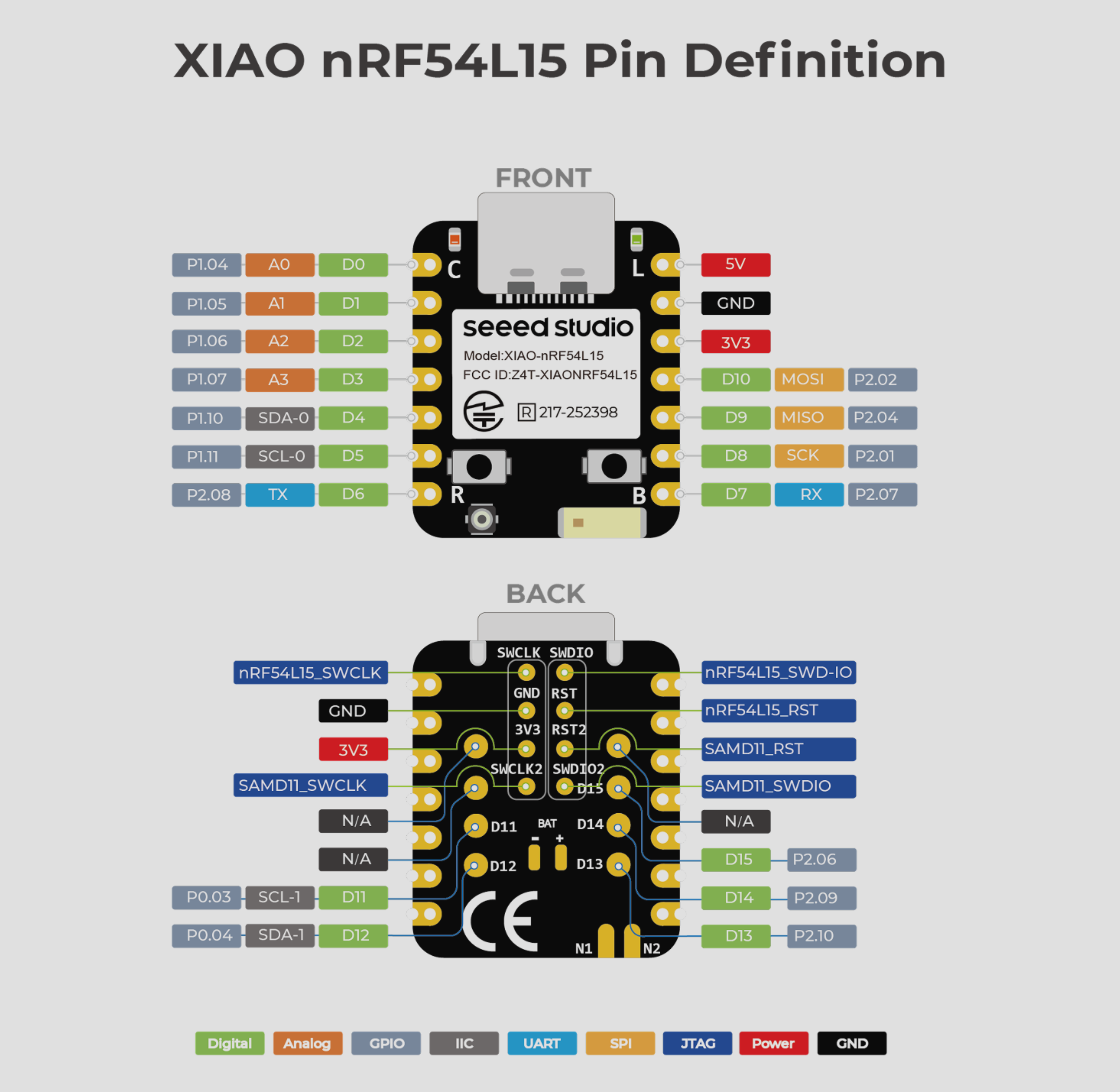
Hardware documents:
- Schematic (PDF): https://files.seeedstudio.com/wiki/XIAO_nRF54L15/Getting_Start/nRF54L15_Schematic.pdf
- Nordic nRF54L15 Datasheet (PDF): https://files.seeedstudio.com/wiki/XIAO_nRF54L15/Getting_Start/Nordic_nRF54L15_Datasheet_v1.0.pdf
- Seeed Getting Started Wiki: https://wiki.seeedstudio.com/xiao_nrf54l15_sense_getting_started/
- ✅ No bundled SDK payloads - NCS/Zephyr SDK are bootstrapped at build time when needed
- ✅ Lean distribution - Boards Manager archive excludes generated SDK/workspace payloads
- ✅ Core Arduino API - Standard digital, timing, serial, Wire, and SPI APIs
- ✅ Board helper library - Sleep/system-off, watchdog, reset-cause, antenna, radio-profile, and peripheral power-gating helpers
- ✅ 64MHz Cortex-M33 - Fast ARM core with DSP instructions
- ✅ 512KB Flash, 64KB RAM - Plenty of memory for your projects
- ✅ CMSIS-DAP debug - Works with built-in debugger on XIAO boards
- ✅ Cross-platform uploader -
Autorunner selectspyOCDthenOpenOCD - ✅ Board Tools menu - Upload method, CPU frequency, antenna, radio profile
- ✅ Curated board-specific examples - Arduino IDE menu is focused on XIAO nRF54L15 BLE/radio/power/GPIO/Sense workflows
- 18 GPIO pins with multi-function capabilities
- Built-in RGB LED (NeoPixel)
- Built-in user button
- SPI, I2C, UART peripherals
- Bluetooth API library (BLE advertise/scan/peripheral examples included)
- BLE central API support (
BLE.connect(...),BLE.disconnect(),BLE.connectLastScanResult(...)) - Bluetooth scan filter APIs (
BLE.setScanFilterName(...),BLE.setScanFilterAddress(...)) for deterministic range probing - Bluetooth scan callback API (
BLE.scanForEach(...)) for streaming all advertisers in dense RF environments - IEEE 802.15.4 library (
IEEE802154) for channel/PAN/address/tx-power config + scan callbacks - Low-power helpers + watchdog API (
XiaoNrf54L15) - CPU frequency + power profile helpers (
cpuFrequencyHz,cpuFrequencyFromToolsHz,setCpuFrequencyHz,applyPowerProfile) - Watchdog compatibility library (
Watchdog.begin(...),Watchdog.feed()) - 12-bit ADC with 8 channels
- 4x PWM outputs
- Everything from XIAO nRF54L15 plus onboard sensors
- 6-DoF IMU (
LSM6DS3TR-C) - Digital microphone (
MSM261DGT006, PDM/DMIC) - Dedicated board option in Arduino IDE: XIAO nRF54L15 Sense (Zephyr-Based)
- Curated Sense examples under
Examples > Sense
- Download or clone this repository
- Copy the
nrf54l15folder to your Arduino hardware directory:- Linux:
~/Arduino/hardware/ - macOS:
~/Documents/Arduino/hardware/ - Windows: not recommended (use Method 3 script install instead)
- Linux:
The folder structure should look like:
Arduino/
└── hardware/
    └── nrf54l15/
        └── nrf54l15/
            ├── boards.txt
            ├── platform.txt
            ├── cores/
            ├── variants/
            ├── libraries/
            └── tools/
- Restart Arduino IDE
- Select Tools > Board > XIAO nRF54L15 (Zephyr-Based - NO BLE)
- Open File > Preferences > Additional boards manager URLs
- Add this package index URL (copy/paste as one line):
https://raw.githubusercontent.com/lolren/NRF54L15-Arduino-core/main/package_nrf54l15_zephyr_based_index.json - Open Tools > Board > Boards Manager
- Search for Seeed nRF54L15 (Zephyr-Based) and install
- Select Tools > Board > XIAO nRF54L15 (Zephyr-Based - NO BLE)
Arduino IDE support:
- Linux
- macOS
Windows warning:
- Sometimes first compilation on Windows fails with
ECONNRESETdue to a bug in the Arduino IDE Windows client (Electron-based). - Workaround: run first setup + first compile with Method 3 (
install_windows.bat) or with Rewritto IDE (Qt6):https://github.com/lolren/rewritto-ide. - After one successful first compilation, switching back to Arduino IDE usually works.
These scripts are independent from Boards Manager installation. Use them when you want guided host setup plus first-time SDK/bootstrap warmup before IDE compile/upload.
Linux:
bash ./install_linux.shWindows (Command Prompt):
install_windows.batRoot launcher scripts:
install_linux.sh-> runstools/install/linux_prereqs.shinstall_windows.bat-> runstools/install/windows_prereqs.bat
tools/install/windows_prereqs.bat has editable variables at the top for:
- Python download/version and installer args
- Git download/version and installer args
- CMake download/version and installer args
- Winget package IDs
Both scripts default behavior:
- Ensures Python, Git, CMake, DTC, and Ninja are installed (auto-installs if missing)
- Copies this core into
<Arduino data>/packages/<vendor>/hardware/nrf54l15/<version> - Preserves existing
tools/ncsandtools/zephyr-sdkcache content on reruns - Bootstraps NCS workspace + Zephyr SDK
- Installs required Zephyr Python build dependencies into
tools/pydepsautomatically - Runs a one-time Zephyr warmup build so IDE compiles are sketch-focused
- Detects Arduino IDE (if installed)
- Detects Arduino data folder (
Arduino15)
Windows-only behavior:
- Uses a short default Zephyr build cache path on Windows (
%LOCALAPPDATA%\nrf54l15-build) to avoid path-length build failures
Linux/Windows script options:
--skip-core-copyto keep using the repo core path without copying--skip-bootstrapto skip NCS/SDK download and warmup build--helpto print usage
Linux/Windows script env overrides:
ARDUINO_DATA_DIRto set explicit Arduino data directoryARDUINO_PACKAGE_VENDORto set package vendor folder (default:nrf54l15)
Windows build-path overrides:
ARDUINO_ZEPHYR_BUILD_DIRto set an explicit build directoryARDUINO_NRF54L15_BUILD_ROOTto change the default short Windows build-root
Troubleshooting if the core does not appear in Boards Manager:
- Ensure the URL above is added as one full line.
- Search
seeed(3 e's) ornrf54l15in Boards Manager. - If you previously installed this core manually, remove/rename
~/Arduino/hardware/nrf54l15(or move it outsidehardware/) and refresh Boards Manager. - If Zephyr build paths are mixed between your local repo and
Arduino15/packages/..., clear staleZEPHYR_BASEand rerun: Windows CMD:set ZEPHYR_BASE=PowerShell:Remove-Item Env:ZEPHYR_BASE -ErrorAction SilentlyContinue
To generate release archive + checksum + updated package index before publishing:
python3 tools/release_boards_manager.py --version <new_version> --repo lolren/NRF54L15-Arduino-coreTo run a local fresh-machine Boards Manager smoke test:
python3 tools/ci_fresh_machine_smoke.pyTo verify release reproducibility (deterministic archive + index content):
python3 tools/check_release_reproducible.pyTo create a clean sync folder (without local SDK/cache artifacts) and zip it for manual GitHub upload:
python3 tools/export_sync_bundle.py --clean --zipDefault output:
- Folder:
sync_export/NRF54L15-Arduino-core-sync - Zip:
sync_export/NRF54L15-Arduino-core-sync.zip
This core bootstraps required NCS/Zephyr SDK components automatically on first build.
No globally installed arm-none-eabi-* toolchain is required.
Host prerequisites:
- Python 3
- Git
- CMake
- Internet access for first-time bootstrap downloads
- Optional manual fallback toolchain page: https://developer.arm.com/downloads/-/arm-gnu-toolchain-downloads
- Optional helper scripts:
tools/install/linux_prereqs.sh,tools/install/windows_prereqs.bat
Bootstrap cache behavior:
- Changing Tools menu options (for example BLE enabled/disabled) reuses cached SDK/NCS data.
- Updating the core version via Boards Manager reuses the same cache under
<Arduino data>/packages/<vendor>/tools/when possible. - Override cache location with
ARDUINO_NRF54L15_SHARED_TOOLS_DIR.
The XIAO nRF54L15 has a built-in CMSIS-DAP debugger. You can upload firmware using:
- Select Tools > Upload Method > Auto (recommended)
- Click the Upload button
pyocd load -t nrf54l15 firmware.hex --format hexopenocd -f tools/openocd/nrf54l15.cfg -c "program firmware.hex verify reset"The clean core exposes these Arduino IDE options:
- Upload Method:
Auto (Recommended),pyOCD (CMSIS-DAP),OpenOCD (Experimental) - CPU Frequency:
64 MHz (Default),128 MHz (Experimental) - Antenna:
On-board Ceramic,External U.FL - Radio Profile:
Radio Disabled,BLE Only,802.15.4 Only,BLE + 802.15.4
For lowest active current, keep CPU Frequency = 64 MHz and use Power/LowPowerProfiles.
When Radio Profile is BLE Only, 802.15.4 Only, or BLE + 802.15.4, the build automatically enforces a 128 MHz radio-safe clock profile.
OpenOCD is marked experimental for nRF54L15 because upstream flash support is incomplete.
If OpenOCD upload fails, the uploader falls back to pyOCD automatically when available.
To sync this local core into your Arduino sketchbook hardware path:
rsync -a --delete /home/lolren/Desktop/Xiaonrf54l15/Nrf54L15_clean/hardware/nrf54l15/ /home/lolren/Arduino/hardware/nrf54l15/| Arduino Pin | Port/Pin | Functions |
|---|---|---|
| D0 | P1.04 | GPIO |
| D1 | P1.05 | GPIO |
| D2 | P1.06 | GPIO |
| D3 | P1.07 | GPIO |
| D4 | P1.10 | GPIO, I2C SDA |
| D5 | P1.11 | GPIO, I2C SCL |
| D6 | P2.08 | GPIO, PWM, UART TX |
| D7 | P2.07 | GPIO, PWM, UART RX |
| D8 | P2.01 | GPIO, PWM, SPI SCK |
| D9 | P2.04 | GPIO, PWM, SPI MISO |
| D10 | P2.02 | GPIO, PWM, SPI MOSI |
| D11 | P0.03 | GPIO |
| D12 | P0.04 | GPIO |
| D13 | P2.10 | GPIO |
| D14 | P2.09 | GPIO |
| D15 | P2.06 | GPIO |
| D16 | P2.00 | LED_BUILTIN (active-low) |
| D17 | P1.02 | Built-in Button |
- A0-A7: ADC channels 0-7 (map to various GPIO pins)
The XIAO nRF54L15 uses USB CDC for serial communication. The board appears as:
- Linux:
/dev/ttyACM0 - macOS:
/dev/cu.usbmodem... - Windows:
COMx
void setup() {
    Serial.begin(115200);
    Serial.println("XIAO nRF54L15 ready!");
}

void loop() {
    Serial.println("Hello!");
    delay(1000);
}The core includes several examples:
- BLE/BLEScanTest - quick BLE scan sanity check
- BLE/BLEAdvertiseTest - quick BLE advertising sanity check
- BLE/BLEScanMonitor - stream all scan hits in each window (
scanForEach) - BLE/BLECentralMonitor - board-level BLE central loop for real-device tests
- Radio/AntennaControl - runtime ceramic/U.FL antenna switch
- Radio/RadioProfileInfo - print Tools menu radio/profile/antenna settings
- Radio/IEEE802154FeatureProbe - board-level 802.15.4 probe/scan example
- Power/battery - VBAT_EN + A7 battery monitor sample
- Power/LowPowerFeatures - sleep + wake behavior checks
- Power/LowPowerProfiles - button-switchable low-power duty profiles
- Power/PeripheralPowerGating - manual peripheral suspend/resume shell
- Power/WatchdogSleepWake - watchdog + sleep + reset-cause validation
- GPIO/InterruptButton - interrupt-driven button handling on board pin map
- libraries/Bluetooth/examples/ - BLE API examples for the clean core
- libraries/Bluetooth/examples/BLEScanForEach - callback-based scan stream demo
- libraries/Bluetooth/examples/BLECentralConnect - central connect/disconnect cycle
- libraries/IEEE802154/examples/ - 802.15.4 config + passive scan examples
- libraries/Watchdog/examples/FeedWatchdog - simple
Watchdog.begin()/feed()compatibility check - libraries/XiaoNrf54L15/examples/AntennaSelect - Runtime antenna switching + radio profile info
- Power/CpuFrequencyControl - CPU frequency monitor/control (Tools + optional runtime set)
- Sense/IMUOrientation - onboard IMU accel/gyro stream
- Sense/MicrophoneLevel - onboard DMIC buffer level monitor
Example program storage usage:
- GPIO/InterruptButton: ~52KB flash, ~19KB RAM
- BLE menu-enabled example: ~180KB flash, ~39KB RAM
- Full featured sketches: varies with selected radio/profile options
This core consists of:
Arduino.h- Main Arduino API definitionscmsis.h- Cortex-M33 CMSIS corenrf54l15.h- nRF54L15 peripheral definitionswiring_*.c- Digital I/O, analog, timing, math, randomHardwareSerial.cpp- UART (Serial)SPI.cpp- SPIWire.cpp- I2CPrint.cpp- Output streamWString.h- String class (inline)main.cpp- Entry pointcore_install.c- Startup and exception handlerssyscalls.c- Newlib system call stubsnrf54l15_linker_script.ld- Memory layoutstartup_nrf54l15.s- Vector table (reference)
- Pin definitions and mappings
- Board-specific initialization
- No USB stack (CDC uses built-in debugger)
- BLE capabilities are menu/profile dependent; validate with BLE examples for your selected controller/profile
BLE + 802.15.4profile has high RAM usage; start from lighter sketches when enabling both radios- Thread/Mesh protocols not implemented
Contributions are welcome! Please:
- Fork the repository
- Create a feature branch
- Make your changes
- Submit a pull request
Apache License 2.0 - See LICENSE file for details
- Based on Nordic Semiconductor nRF54L15 reference materials
- Inspired by the Arduino nRF52 core
- CMSIS-CORE by ARM Ltd.
- nRF54L15 Product Page
- XIAO nRF54L15 Wiki
- XIAO nRF54L15 Getting Started
- XIAO nRF54L15 Schematic (PDF)
- XIAO nRF54L15 Pin/Board Definition Image
- Nordic nRF54L15 Datasheet (Seeed mirror PDF)
- Data Sheet
