









Twinverse is an tool for Linux/SteamOS that allows you to create and manage multiple instances of gamescope and steam simultaneously. This enables multiple players to enjoy their game library on a single computer, either in split-screen mode or each with their own display, along with dedicated audio output and input devices.
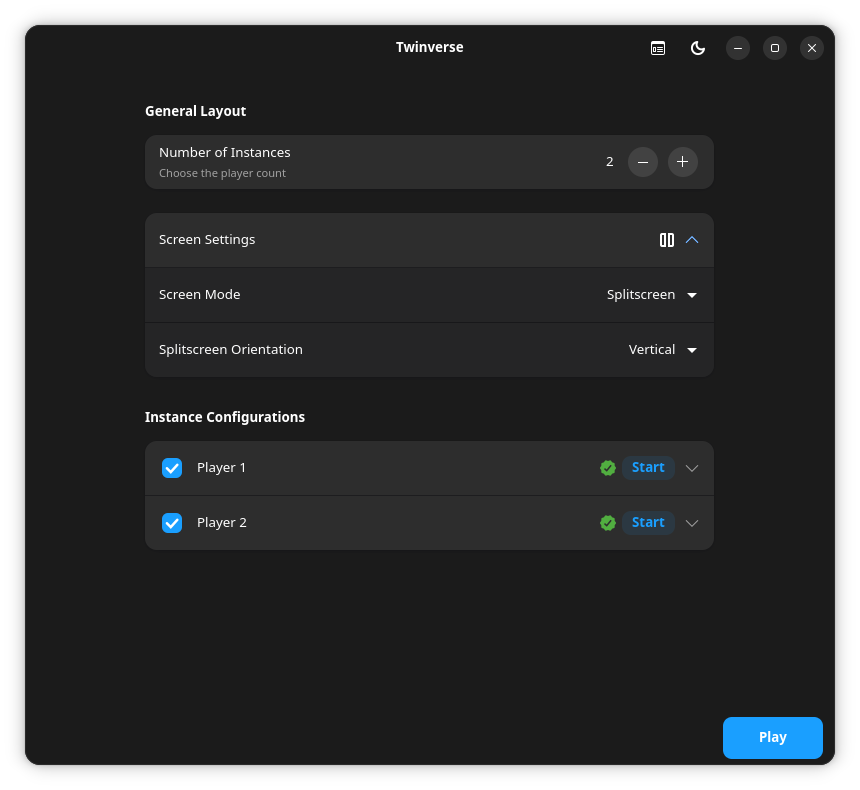
Twinverse is designed as a flexible solution for simultaneous multi-gaming on Linux. Here are some of its main features:
- Simple Multi-Instance Management: Run multiple Steam instances simultaneously, allowing you and your friends to enjoy your game libraries separately.
- Per-Instance Hardware Assignment: Assign specific mice, keyboards, and controllers to each game instance. (Mouse/Keyboard can only be assigned to one instance at a time)
- Dedicated Audio Channels: Route audio from each game instance to a separate audio output device.
- Separate Home Directory: Twinverse allows you to have a new, separate home for each instance, enabling you to customize settings and files individually. (Does not interfere with your standard Home directory)
- Shared Game Library: Twinverse allows you to share the Steam game directory among multiple instances, saving disk space and making game updates easier. (Users need to own the game in their Steam libraries to run it)
- Use Any Proton: Twinverse lets you use any version of Proton to run your games, including custom protons like ProtonGE.
- Play What You Want: Instances are not limited to playing the same game; each instance can play whichever game it wants (provided the user owns the game in their Steam library).
horizontal-demo.webm
Note
You need to have installed the gamescope, steam and mangoapp packages native to your distro.
SteamOS and Bazzite usually have all dependencies included by default.
Twinverse should work well on any system that supports Gamescope and Steam.
The recommended way to install Twinverse is via Flatpak, which provides a sandboxed environment and easier updates. You can install it from Flathub (once available) or from a .flatpak file from the releases page.
Option 1: Install from Flathub (Coming Soon) Once Twinverse is available on Flathub, you can install it using the following commands:
flatpak remote-add --if-not-exists flathub https://flathub.org/repo/flathub.flatpakrepo
flatpak install flathub io.github.mall0r.Twinverse
Option 2: Install from a .flatpak file
-
Download the Latest .flatpak file: Go to the Releases page and download the latest
.flatpakfile. -
Install the Flatpak: You can install the Flatpak with the following command:
flatpak install --user Twinverse-*.flatpak
Note
Make sure you have the bubblewrap package installed.
Alternatively, you can use the AppImage version. This single file works on most modern Linux distributions without requiring system installation.
-
Download the Latest AppImage: Go to the Releases page and download the latest
.AppImagefile. -
Make it Executable: After downloading, right-click the file, go to "Properties," and check the "Allow executing file as program" box. Alternatively, you can use the terminal:
chmod +x Twinverse-*.AppImage -
Run the Application: Run the AppImage and enjoy. That's it!
For better system integration (e.g., adding a menu entry), you can use a tool like Gear Lever to manage your AppImage.
Access our Guide for more information on how to use Twinverse.
Twinverse is under active development; some bugs may still be encountered. If you encounter issues, feel free to share your feedback and report bugs in the Issues section.
Twinverse uses Bubblewrap (bwrap), a low-level Linux sandboxing tool, to isolate each Steam instance. This ensures that the instances do not interfere with each other or with the user's main system. Furthermore, the Gamescope command line is dynamically generated based on the user's settings, involving the bwrap command which, in turn, launches Steam.
If you wish to contribute to Twinverse or run it directly from the source code, follow the instructions below.
The run.sh script provides a quick way to set up a local environment and run the application. It will automatically create a virtual environment and install the necessary dependencies.
# Clone the repository
git clone https://github.com/mall0r/Twinverse.git
cd Twinverse

# Run the launch script
./run.shTwinverse provides a Makefile to manage builds and versioning. You can build the application using the following command:
make buildAlternatively, you can use the build script directly:
./scripts/build.shThe scripts/package-appimage.sh script automates the process of creating an AppImage. It first runs the build script and then uses linuxdeploy to package the application into a distributable .appimage file.
make appimageOr using the script directly:
./scripts/package-appimage.shThe scripts/package-flatpak.sh script automates the process of creating a Flatpak. It will build the application and then package it into a .flatpak file.
make flatpakOr using the script directly:
./scripts/package-flatpak.shWe welcome contributions from everyone! If you are interested in helping improve Twinverse, follow these steps:
- Fork the Repository: Create your own copy of the project on GitHub.
- Create a Branch: Create a new branch for your feature or bug fix (
git checkout -b my-amazing-feature). - Make Your Changes: Implement your improvements.
- Submit a Pull Request: Open a pull request detailing your changes for review.
This project is licensed under the GNU General Public License v3.0 (GPL-3.0). For more details, see the LICENSE file.
Twinverse is an independent open-source project and is not affiliated with, endorsed by, or in any way officially connected to Valve Corporation or Steam.
This tool acts as an orchestration layer that leverages sandboxing technologies (bubblewrap) to run multiple isolated instances of the official Steam client. Twinverse does not modify, patch, reverse engineer, or alter any Steam files or its normal operation. All Steam instances launched by this tool are the official, unmodified versions provided by Valve.
Users are solely responsible for complying with the terms of the Steam Subscriber Agreement.
This project was inspired by the work of:
- NaviVani-dev and their script dualscope.sh.
- Tau5 and their project Co-op-on-Linux.
- wunnr and their project Partydeck (I recommend using it if you're looking for an approach closer to Nucleus Co-op).

