Course assignment that investigates procedural mesh generation and cg shader implementations for lighting and procedural texture painting.
This project is made using Unity 2018.2.14f1 for the CSC 305: Introduction to Computer Graphics course at the University of Victoria, and is meant to be a learning tool to investigate the use of procedural mesh generation techniques such as perlin noise based height mapping and the use of custom shaders. Particular thanks is given to Sebastian Lague (link to resources below) who has provided superb tutorials and guided videos on much of the topics investigated in this assignment.
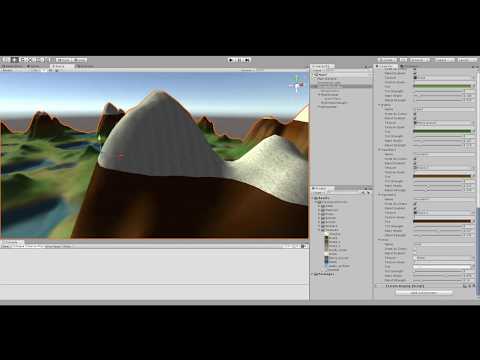
- Customizable within the Unity Editor, with dynamic updating as changes are made
- Perlin noise height map generation
- Custom mesh generation, with advanced height assignment controls
- Blinn-Phong shading implementation
- Custom shader for displaying various textures based on vertex elevation
- Support for blending between textures and applying tint
- Simple camera movement for exploring the scene
- Water effects via custom shader; lateral movement as well as simple vertical ripple movement
- 3d model prop distribution over the generated terrain, with advanced controls for per-prop region-based placement and spawn chance
- Distance-to-camera based scene desaturation effect implemented via custom shaders
NOTE: If the terrain object goes black and unlit, hit the GenerateMesh button on the TerrainGenerator component to recompute the values needed for the shader.
The scene contains a TerrainGenerator object with 3 components on them.
- The TerrainGenerator component configures noise and mesh settings, and has the controls for instantiating the mesh and props, as well as reloading shader settings.
- The TerrainDisplay component handles drawing noise texture and 3d mesh to the scene as requested, as well as contains references to materials and gameobject renderers
- The TerrainShader component configures all shader options, including lighting parameters, texturing parameters, water effects parameters, and distance-desaturation parameters. Light direction is modified by using the MyDirectionalLight object in the scene (it just offers nicer control than using raw vector3 values)
The scene also contains a PropPopulator object with 1 component attached.
- The PropPopulator component configures all the props we wish to spawn on the terrain and their associated restrictions and customization features. Spawning and clearing props is done on the TerrainGenerator component, however (to keep the editor buttons in one place).
Much support was found online to assist me with the completion of this project, but mention is made to the most relevant resources I utilized, along with thanks to the resource providers for their assistance in helping me to learn about procedural mesh generation and shaders.
- Excellent tutorial series and guidance on procedural mesh generation
- In particular, the resources pertaining to Noise map and mesh display; mesh manipulation; color and texture shading with blending; among other useful topics.
- A nice C# implementation of Ken Perlin's noise functions
- Trees and rocks 3d model assets
- House 3d model asset
- Transparency shader (used for water shader)
- General shader tutorials and guides
- The Unity Engine