
RustExcel is a Rust library designed to simplify the creation and manipulation of Excel (.xlsx) files. It provides a high-level RustExcel object to interact with Excel spreadsheets, making common tasks more straightforward. Under the hood, RustExcel leverages the umya_spreadsheet crate for handling the intricacies of the .xlsx file format.
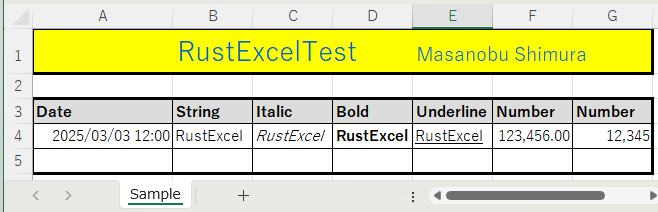
fn sample() {
    let mut re = RustExcel::new();
    let mut book: &mut Spreadsheet = re.get_book();
    re.new_sheet("Sample");
    re.set_column_width(1,1,17.5);
    re.set_column_width(2,7,10.0);
    re.set_row_height(1,1,33.8);
    re.set_font_color("A1:G1", "0067C0");
    re.set_background_color("A1:G1", "FFFF00");
    re.set_font_size("A1:D1", 20.0);
    re.set_font_size("E1:G1", 14.0);
    re.set_cell_string("B1", "RustExcelTest");
    re.set_cell_string("E1", "Masanobu Shimura");
    re.set_vertical_aliginment("E1:G1", VerticalAlignmentValues::Bottom);
    re.set_border_style("A1:G1", "tblr", BorderStyleValues::Thick);
    re.set_border_all("A3:G5", "tblr", BorderStyleValues::Thin);
    re.set_border_style("A3:G5", "tblr", BorderStyleValues::Thick);
    re.set_background_color("A3:G3", "dcdcdc");
    re.set_font_style_bold("A3:G3", true);
    re.set_row(3);
    re.set_cell_string_by_col_number(1, "Date");
    re.set_cell_string_by_col_number(2, "String");
    re.set_cell_string_by_col_number(3, "Italic");
    re.set_cell_string_by_col_number(4, "Bold");
    re.set_cell_string_by_col_number(5, "Underline");
    re.set_cell_string_by_col_number(6, "Number");
    re.set_cell_string_by_col_number(7, "Number");
    re.set_cell_date("A4", 2025, 03, 03, 12, 00, 00);
    re.set_number_format("A4", "yyyy/mm/dd hh:mm".to_string());
    re.set_cell_string_by_coordinate(4,2, "RustExcel");
    re.set_cell_string_by_coordinate(4,3, "RustExcel");
    re.set_cell_string_by_coordinate(4,4, "RustExcel");
    re.set_cell_string_by_coordinate(4,5, "RustExcel");
    re.set_font_style_italic("C4", true);
    re.set_font_style_bold("D4", true);
    re.set_font_style_under_line("E4", UnderlineValues::Single);
    re.set_cell_number("F4", 123456.0);
    re.set_number_format("F4", "#,##0.00".to_string());
    re.set_cell_number("G4", 12345.0);
    re.set_number_format("G4", "#,##0".to_string());
    re.save("sample.xlsx");

}- Context-Based Operations: The core of RustExcel is the
RustExcelstruct, which serves as a central point for managing your Excel spreadsheet. - Sheet Management:
- Create new sheets with specified names.
- Set the active sheet by index or name.
- Access the active sheet for modification.
- Cell Manipulation:
- Set cell values as strings, numbers, or dates.
- Get cell objects for more advanced operations.
- Access cells by coordinates (e.g., "A1") or by row and column numbers.
- Style Management:
- Set font properties (name, size, bold, italic, underline, strike).
- Set font color.
- Set border style.
- Set background color.
- Set number format.
- Date:
- Set cell date.
- Parse:
- Parse range.
The RustExcel struct is the primary interface for working with Excel files in RustExcel. It manages the Spreadsheet object from umya_spreadsheet, the active sheet, and other contextual information.
Key Methods:
new(): Creates a new, empty Excel file context.read(path): Read Excel file context.get_book(): Returns a mutable reference to the underlyingSpreadsheetobject.new_sheet(name: &str): Creates a new sheet with the given name and sets it as the active sheet.set_sheet_by_index(index: usize): Sets the active sheet by its index (0-based).set_sheet_by_name(name: &str): Sets the active sheet by its name.get_sheet(): Returns a reference to the active sheet.get_sheet_mut(): Returns a mutable reference to the active sheet.set_row(row: u32): Sets the current row.get_row(): get the current row.set_row_height(row_from: u32,row_to:u32, height: f64) ): Sets row height.set_column_width(col_from: u32,col_to:u32, width: f64): Sets row width.set_cell_string(cell: &str, value: &str): Sets the string value of a cell (e.g., "A1").set_cell_number(cell: &str, value: f64): set a number value in cell.set_cell_date(cell: &str, year: u32, month: u32, day: u32, hour: u32, minute: u32, second: u32): set a date value in cell.set_cell_string_by_coordinate(row: u32, col: u32, value: &str): Sets a string value of a cell by its row and column numbers.set_cell_number_by_coordinate(row: i32, col: i32, value: f64): Sets a number value of a cell by its row and columnset_cell_date_by_coordinate(&mut self,row: i32,col: i32,year: u32,month: u32,day: u32,hour: u32,minute: u32,second: u32): Sets a date value of a cell by its row and columnget_cell(cell: &str): Gets a mutable reference to a cell by its coordinate.get_cell_by_coordinate(row: u32, col: u32): Gets a mutable reference to a cell by its row and column numbers.get_cell_by_col(col: u32): Gets a mutable reference to a cell by its column number in the current row.get_style(cell: &str): Gets a mutable reference to the style of a cell.get_style_by_coordinate(row: u32, col: u32): Gets a mutable reference to the style of a cell by its row and column numbers.get_style_by_col(col: u32): Gets a mutable reference to the style of a cell by its column number in the current row.set_font_size(range: &str, font_size: f64): Set font size in a range.set_font_style_bold(range: &str, font_style: bool): Set font style bold in a range.set_font_style_italic(range: &str, font_style: bool): Set font style italic in a range.set_font_style_under_line(range: &str, value: UnderlineValues): Set font style under line in a range.set_font_style_strike(range: &str, value: bool): Set font style strike in a range.set_font_name(range: &str, value: &str): Set font name in a range.set_font_char_set(range: &str, value: FontCharSet): Set font char set.set_font_color(range: &str, value: &str): Set font color in a range.
set_border_style(range: &str, pos: &str, border_style: BorderStyleValues): set border style in a range.set_border_all(range: &str, pos: &str, border_style: BorderStyleValues): set all borders in a range.set_background_color(range: &str, value: &str): Set background color in a range.set_number_format(range: &str, value: String): Set number format in a range.
set_horizontal_aliginment(range: &str, value: HorizontalAlignmentValues):Set horizontal alignment in a range.set_vertical_aliginment(range: &str, value: VerticalAlignmentValues):et vertical alignment in a range.save(path: &str): Saves the Excel file to the specified path.
umya_spreadsheet: Core Excel file handling library.regex: For parsing cell ranges.chrono: for date and time management.
Add the following to your Cargo.toml file:
[dependencies]
rustexcel = "0.1" # Replace with the actual version number
umya_spreadsheet = "2.2.3"
regex = "1"
chrono = "0.4"MIT
Pull requests are welcome. For major changes, please open an issue first to discuss what you would like to change.