Config
Please read through this carefully if you do not understand something in the config.json file.
- Token ~
"token": "your.bot.token"- Its pretty self explanatory, the token of the bot application you have created on https://discord.dev/ - Dev ~
"dev": "your-id"- Developer ID, it's just your id, needed for the /reload command - How to get - Name ~
"name": "LiveUnderflow"- The name of the bot, not important, only used in one command - IPS:
-
Main ~
"main": "main-ip"- The ip of the main server -
N00b ~
"n00b": "noob-proxy-ip"- The ip of the noob bot proxy - Guild:
-
ID ~
"id": "guild-id"- Id of the guild(server) the bot will run in - How to get -
Channels: - How to get IDS
-
Log Channel ~
"logchan": "log-channel-id"- Channel id for logging accepted applications & vouches -
App Category ~
"appcat": "application-category-id"- Category id for applications -
Status Channel ~
"statchan": "status-voice-channel-id"- Voice Channel id for main server status -
Roles: - How to get IDS
-
RWX ~
"rwx": "moderator-role-id"- Moderator role ID -
RW ~
"rw": "solutions-role-id"- RW Role id ~ Solutions role / used forapplyandvouch - Auto Data:
-
Delay ~
"delay": 30- How often to update the server status / used forvc statusandbot status - Cooldown:
-
Enabled ~
"enabled": true- Should the /check command cooldown be enabled? -
Time ~
"time": 180- Time in seconds for the delay - Filter ~
"filter": ["bannedword1", "1.1.1.1"]- Array of words which should be blocked
How to enable developer mode:
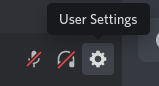
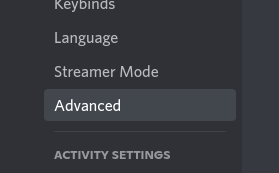

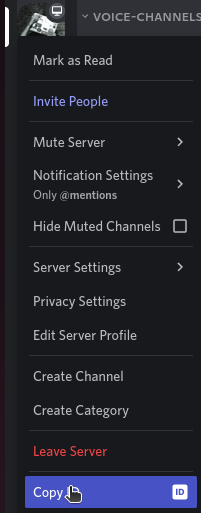
Make sure Developer mode is enabled, then rightclick on the server icon
Make sure Developer mode is enabled, then rightclick on the channel
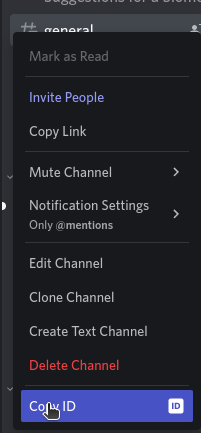
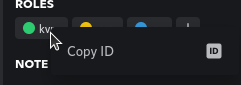
Make sure Developer mode is enabled, then rightclick on the role in the Roles menu or on a user's profile