This project was bootstrapped with Create React App.
- React
- Typescript
- MaterialUI - Lib with some styled components according google design
- Styled-components - Lib to style components with css in javascript (or typescript) files
- ReactN - Lib to manager the global state
- React Router DOM - Lib to manager the url routes of the project
- Axios - Lib to conect with rest apis
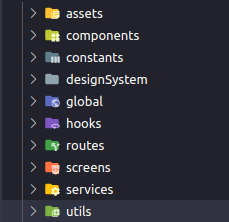
-
assets=> The folder that keeps the .png and .svg files that I got in the Figma layout -
components=> The folder that keeps the ordinary components that I created to the project. In this project, there are three: Header, EditableTags (the created tags in "Add more" button) and BreweryCard. There are other components in project, in DesignSystem and Screens folders, that I will give more details below. Each component is separeted in this files:- index.tsx => who keeps the component to be exported to foreing folders and keeps all component logic that doesn't about design;
- view.tsx => who keeps JSX ("html" of React) structure of component and design logic (if necessary some design logic). This component is responsible to import the styled components from design system or styled components file;
- style.tsx => who keeps all components that demand some css config by
styled-componentslib; - interfaces.ts => who keeps the interfaces to type the props of components from view.tsx or index.tsx
- other stuff => according demand of component, is possible exists other files as specific custom hooks that will be use just by one component.
-
constants=> The folder that keeps static values of project. In this project the folder is keeping the base url of API (api.ts) and all strings that will be render as text of interface project (interfaceTexts.ts). -
designSystem=> This folder was created to separate all stuff coming from external design system lib that the project is using. This is extremely important to avoid some hard design bugs when some critical change happen in design system config, components, libs etc. Because if the design system stuff is scattered into the components, some change can demand search for each component that use the thing that changes, while with a designSystem folder, we fix the problem just in one place.
This folder have two folder who separete ordinary components (components folder) and icons (icons folder) ofMaterialUI. A themeProvider.tsx file, to provide some commom stuff of designSystem project, as color pallete, font-family, etc. And a index.ts to export a object called designSystem, who keepps all components of the folder. -
global=> The folder that keeps the global state of project. There is a division by folders in global state according the theme of the values. Like the entities folders that have the user entity folder and the brewery entity folder: this two folders keeps their respective global values. And in the end, all folders are reunited in initialGlobalState.ts file, to provide the global value to whole project. -
hooks=> That keeps some custom hooks that could be commom in more than one component or even commom with another project. -
routes=> The folder that keeps the routes config. This project there are two routes: "/" and "/login", the first is the route to brewery dashboard page, and the second, the route to login page. -
screens=> The folder that keeps components that represents some whole screen of project. Is important this division between the screens and the components folder, because some screen logics provide props to a really deep tree of components, so to became easier to developer access this screens is a good way to keep good usability of project. Usually, one screen represent the whole component of a route, so as we have two routes in this project, we have two screens too. -
services=> The folder that keeps the connections with forein services. In this project, just the connection with the rest API to get breweries. -
utils=> The folder that keeps some util stuff that can be used in more than one case. In this project, just a regex function who validate text without number and special characters.
After clone of repository, run:
So, open react project, running:
Open http://localhost:3000 to view it in the browser.
You can learn more in the Create React App documentation.
To learn React, check out the React documentation.