
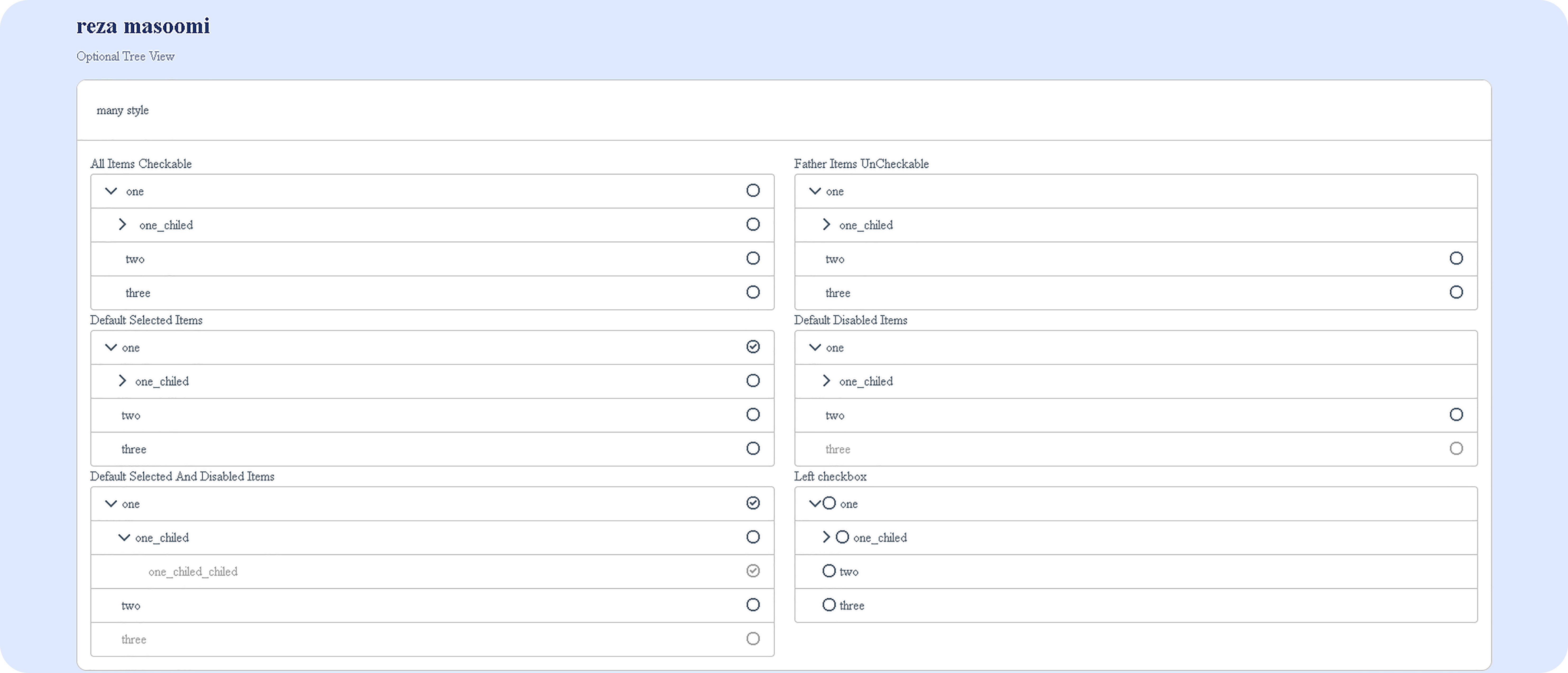
- checkable all items
- checkable just last chiled level items
- disabled default items
- checked default items
- multi level
- multi choice or single choice
- rtl and ltr
- right or left position of checkbox
- show child count
<link rel="stylesheet" href="css/bootstrap.css">
<script src="js/jquery-3.6.4.js"></script>
<script src="js/optional-treeview.js"></script>
and add this for get icons
<script src="https://kit.fontawesome.com/aec3832ad8.js" crossorigin="anonymous"></script><a>All Items Checkable</a>
<div class="form-group">
<div id="tree_view_div_id"></div>
</div>function createTreeArray(data, selected_items, disable_items){
let treeData=[];
for(let i=0;i<data.length;i++){
if(data[i]["master_id"]===null){
let item={
id: data[i]["id"],
text: data[i]["step_name"],
state:{
checked:false,
disabled:false
}
};
//set selected items
for(let t=0;t<selected_items.length;t++)
{
if(selected_items[t]===item["id"]){
item.state.checked=true;
break;
}
}
//set disable items
for(let t=0;t<disable_items.length;t++)
{
if(disable_items[t]===item["id"]){
item.state.disabled=true;
break;
}
}
if(loop(item)!== false){
item.nodes=loop(item)
}
treeData.push(item);
}
}
function loop(input){
let array_of_items=[];
let item={}
let exists=false;
for(let b=0;b<data.length;b++){
if(data[b]["master_id"]===input["id"]){
exists=true;
item={
id: data[b]["id"],
text: data[b]["step_name"],
state:{
checked:false
}
};
//set selected items
for(let t=0;t<selected_items.length;t++)
{
if(selected_items[t]===item["id"]){
item.state.checked=true;
break;
}
}
//set disable items
for(let t=0;t<disable_items.length;t++)
{
if(disable_items[t]===item["id"]){
item.state.disabled=true;
break;
}
}
if(loop(item)!== false){
item.nodes=loop(item)
}
array_of_items.push(item);
}
}
if(exists===false)
return false;
return array_of_items;
}
return treeData;
}this function need three input array
- data (array of object of all data like: [{"id":1,"step_name":"one","master_id":null},{"id":4,"step_name":"one_chiled","master_id":1}])
- selected_items (array of "id" for set selected like: [1,3])
- disable_items (array of "id" for set disabled like: [2,3,5])
let allSteps=
[{"id":1,"step_name":"one","master_id":null},{"id":4,"step_name":"one_chiled","master_id":1},{"id":5,"step_name":"one_chiled_chiled","master_id":4},
            {"id":2,"step_name":"two","master_id":null},
            {"id":3,"step_name":"three","master_id":null}];
input data is a array of objects that any object has three field
- "id": unique field for any item
- "step_name": text for items
- "master_id": father id for item
let treeD=createTreeArray(allSteps,[],[]);$('#tree_view_div_id').treeview({
data: treeD,
showIcon: true,
showCheckboxForMasters: true,
showCheckbox: true,
CheckboxLeft: false,
multiSelect: true,
onNodeChecked: function(event, node) {
},
onNodeUnchecked: function (event, node) {
}
});| option name | value | description |
|---|---|---|
| data | array like: [{"id":1,"step_name":"one","master_id":null},{"id":4,"step_name":"one_chiled","master_id":1},{"id":5,"step_name":"one_chiled_chiled","master_id":4}] | this is an array of objects with three field |
| showCheckboxForMasters | -true -flase | this is for show check box for items that have child |
| showCheckbox | -true -flase | this is for show check box for all items |
| CheckboxLeft | -true -flase | this is for show check box befor item text or opposite side of tex |
| multiSelect | -true -flase | this is for enable multi choice or single choice |
| ShowChildCount | -true -flase | this is for show chiled count |
#treeView#bootstrap treeview#laravel#html#css#rtl treeview#rtl bootstrap treeview