- MacOS Version: MacoS Monterey - 12.2 (also notes for building on Ventura 13.0.1)
- Python Version: 3.10.8 (note that python3 is preinstalled on macOS 13.0.1 )
$ ls `xcode-select -p`/Platforms/MacOSX.platform/Developer/SDKsTo check whether you have it, and what version you have.
Output:
MacOSX.sdk  MacOSX12.3.sdk
or
MacOSX.sdk MacOSX13.0.sdk MacOSX13.sdkClone the depot_tools repository:
$ git clone https://chromium.googlesource.com/chromium/tools/depot_tools.gitAdd depot_tools to the end of your PATH (you will probably want to put this in your ~/.bash_profile or ~/.zshrc). Assuming you cloned depot_tools to /path/to/depot_tools (note: you must use the absolute path or Python will not be able to find infra tools):
$ export PATH="$PATH:/path/to/depot_tools"mkdir -p $HOME/nwjs
cd $HOME/nwjs
gclient config --name=src https://github.com/nwjs/chromium.src.git@origin/nw71This step will create a hidden file named .gclient.
Note: Here I have checked out the latest version of NW.js which is v0.71.0 (or nw71).
Generally if you are not interested in running Chromium tests, you don’t have to sync the test cases and reference builds, which saves you lot of time. Open the .gclient file you just created and replace custom_deps section with followings:
"custom_deps" : {
    "src/third_party/WebKit/LayoutTests": None,
    "src/chrome_frame/tools/test/reference_build/chrome": None,
    "src/chrome_frame/tools/test/reference_build/chrome_win": None,
    "src/chrome/tools/test/reference_build/chrome": None,
    "src/chrome/tools/test/reference_build/chrome_linux": None,
    "src/chrome/tools/test/reference_build/chrome_mac": None,
    "src/chrome/tools/test/reference_build/chrome_win": None,
}
Manually clone and checkout correct branches (in my case it was nw71) for following repositories:
- NW.js
- Path:
src/content/nw - Repo: https://github.com/nwjs/nw.js
- Create a
srcfolder,cdtosrcfolder, clone, and rename thenw.jsfolder tonw
- Path:
- Node
- Path:
src/third_party/node-nw - Repo: https://github.com/nwjs/node
cdtosrcfolder, clone, and rename thenodefolder tonode-nw
- Path:
- V8
- Path:
src/v8 - repo: https://github.com/nwjs/v8
cdtosrcfolder, clone
- Path:
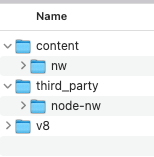
Run following command in your terminal:
cd nwjs
gclient sync --no-history
This usually downloads 20G+ from GitHub and Google's Git repos. Make sure you have a good network provider and be patient.
When finished, you will see a src folder created in the same folder as .gclient.
The macOS 13.0.1 compiler complains about the use of 'sprintf', and the compilation fails. To avoid this problem, modify this section in nwjs/src/third_party/harfbuzz-ng/BUILD.gn
  config("harfbuzz_warnings") {
    if (is_win) {
      # Result of 32-bit shift implicitly converted to 64 bits.
      cflags = [ "/wd4334" ]
    }
  }
to this
config("harfbuzz_warnings") {
   if (is_win) {
     # Result of 32-bit shift implicitly converted to 64 bits.
     cflags = [ "/wd4334" ]
   }
   if (is_ios || is_mac) {
     cflags = [ "-Wno-error", "-Wno-deprecated-declarations" ]
   }
}export GYP_DEFINES="target_arch=x64 building_nw=1"
gn gen out/nw '--args=is_debug=false is_component_ffmpeg=true target_cpu="x64" symbol_level=1 nwjs_sdk=false proprietary_codecs=true ffmpeg_branding="Chromium" enable_stripping=true enable_dsyms=true enable_precompiled_headers=false' --root=.Note: For the above command I received the follwoing error:
//content/nw:dump(//build/toolchain/mac:clang_x64)
  needs //chrome:nw_sym_archive(//build/toolchain/mac:clang_x64)
Resolution: Remove this line in nw/BUILD.gn
"//chrome:nw_sym_archive"For more info refer to this link: nwjs/nw.js#7438
export GYP_CHROMIUM_NO_ACTION=0
export GYP_DEFINES="target_arch=x64 building_nw=1 clang=1 nwjs_sdk=1 disable_nacl=0 buildtype=Official"
export GYP_GENERATORS=ninja
export GYP_GENERATOR_FLAGS=output_dir=out
python3 src/third_party/node-nw/tools/gyp/gyp_main.py -I src/third_party/node-nw/common.gypi -D build_type=Release src/third_party/node-nw/node.gypcd src
ninja -C out/nw nwjsThe resulting NW.js executable (named nwjs) can be found at the following path: ~/nwjs/src/out/nw/nwjs.app/Contents/MacOS/nwjs
Note: While building NW.js, I encountered following missing files error. They were in a different folder, I simply copied them to where the error was coming from.
Error processing node <?xml version="1.0" encoding="UTF-8"?>
<include file="${root_gen_dir}\chrome\browser\resources\inline_login\preprocessed\inline_login_app.js" name="IDR_INLINE_LOGIN_APP_JS" type="BINDATA" use_base_dir="false" />: [Errno 2] No such file or directory: '../../out/nw/gen/chrome/browser/resources/inline_login/preprocessed/inline_login_app.js'

Error processing node <?xml version="1.0" encoding="UTF-8"?>
<include file="${root_gen_dir}\chrome\browser\resources\inline_login\preprocessed\inline_login_browser_proxy.js" name="IDR_INLINE_LOGIN_BROWSER_PROXY_JS" type="BINDATA" use_base_dir="false" />: [Errno 2] No such file or directory: '../../out/nw/gen/chrome/browser/resources/inline_login/preprocessed/inline_login_browser_proxy.js'
Here are the copy commands:
cp ~/nwjs/src/out/nw/gen/chrome/browser/resources/inline_login/tsc/inline_login_app.js ~/nwjs/src/out/nw/gen/chrome/browser/resources/inline_login/preprocessed
cp ~/nwjs/src/out/nw/gen/chrome/browser/resources/inline_login/tsc/inline_login_browser_proxy.js ~/nwjs/src/out/nw/gen/chrome/browser/resources/inline_login/preprocessed
If the copy commands fail (because the source files are missing), then build them like this and retry the copy commands:
cd ~/nwjs/src
ninja -C out/nw chrome/browser/resources/inline_login:build_ts
FYI, there are some other targets that seem related to the missing JS files. It is worth trying to build these other targets (with the ninja -C ...) command to see if the build system generates the JS files and (with luck) also copies them to the proper location. Here are several gn targets that seem related:
cd ~/nwjs/src
gn ls out/nw | grep resources
The related targets are:
//chrome/browser/resources/inline_login:build_grd
//chrome/browser/resources/inline_login:build_ts
//chrome/browser/resources/inline_login:html_wrapper_files
//chrome/browser/resources/inline_login:preprocess
//chrome/browser/resources/inline_login:preprocess_static_files
//chrome/browser/resources/inline_login:resources
//chrome/browser/resources/inline_login:resources_gritcd src
ninja -C out/Release nodeAfter building Node, the final step is to copy the build Node library to the nwjs binary folder:
cd src
ninja -C out/nw copy_nodeFollow the steps listed under following section: https://nwjs.readthedocs.io/en/latest/For%20Users/Getting%20Started/
Write NW.js App
Example 1 - Hello World
Reference link for old build steps: https://nwjs.readthedocs.io/en/latest/For%20Developers/Building%20NW.js/