
A python library to note ml experiments on google sheet.
labgsheet provides an easy way to note ml experiments on Google Sheet.
You can use labgsheet in cosole like following:
# prepare for worksheet by gspread
>>> import gspread
>>> from oauth2client.service_account import ServiceAccountCredentials
>>> scope = ['https://spreadsheets.google.com/feeds', 'https://www.googleapis.com/auth/drive']
# download credentials.json previously from Google Developers Console
>>> credentials = ServiceAccountCredentials.from_json_keyfile_name('credentials.json', scope)
>>> gc = gspread.authorize(credentials)
>>> ws = gc.create("Test for labgsheets").sheet1
# note an experiment where params and a metric are used
>>> from labgsheet import Experiment
>>> exp = Experiment(ws)
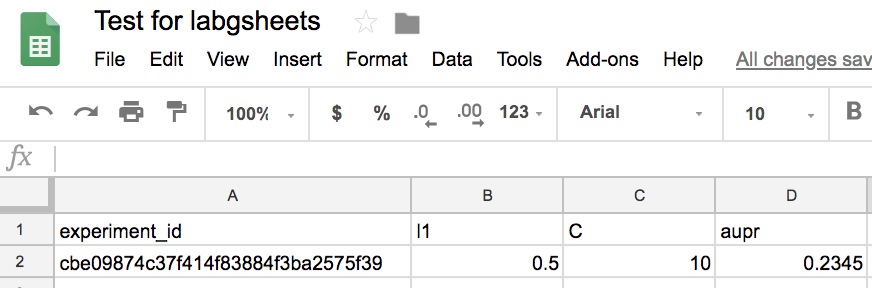
>>> exp.log_multi_params({'l1': 0.5, 'C': 10})
>>> exp.log_metric('aupr', 0.2345)
You can also use labgsheet in Google Colaboratory like following:
! pip install labgsheet
! pip install --upgrade -q gspread

from google.colab import auth
auth.authenticate_user()

import gspread
from oauth2client.client import GoogleCredentials

gc = gspread.authorize(GoogleCredentials.get_application_default())
ws = gc.create("Test for labgsheets").sheet1

from labgsheet import Experiment
exp = Experiment(ws)
exp.log_multi_params({'l1': 0.5, 'C': 10})
exp.log_metric('aupr', 0.2345)
After logging, you can get a google sheet like below:
To install labgsheet, use pipenv (or pip):
$ pipenv install labgsheet- Fork
- Create a feature branch
- Commit your changes
- Rebase your local changes against the master branch
- Create new Pull Request