A Sublime Text 2/3 package to make finding and opening files less painful. Keep your hands on the keyboard with smart auto completion, history, and directory listings.
Use cmd + o or cntl + o as usual (or choose Find File in the command pallete.)
-
Pressing tab will cause smart completion to occur (hint:
f1can complete tofilename1!) -
Double-pressing tab will give you the directory listing
-
Up/down allow you to navigate previously entered paths
-
Opening a path that doesn't exist will create a new file or directory
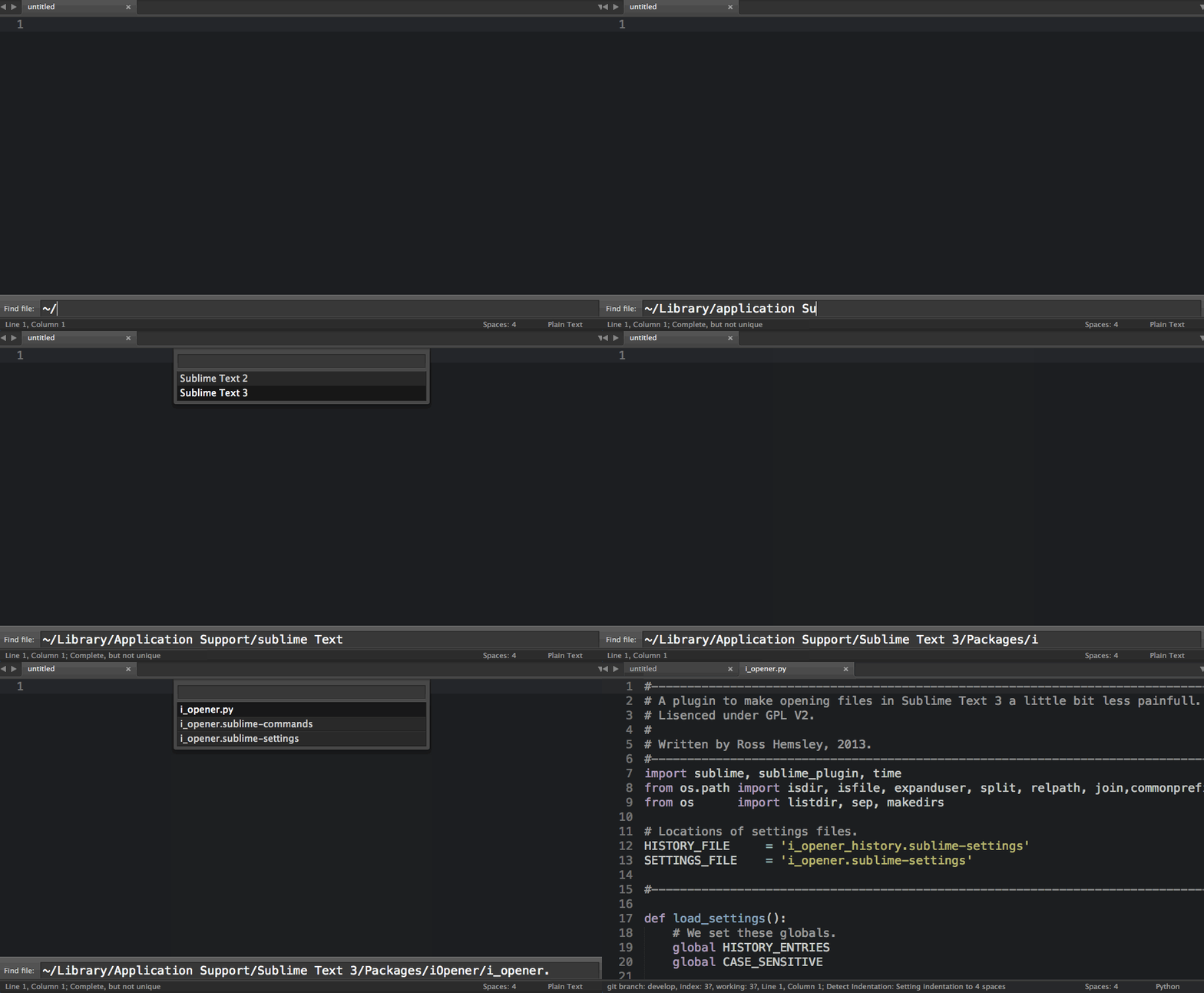
-
This plugin will take over your default 'open file' shortcut. To use your system default, use
cmd + shift + oorctrl + shift + o -
The open panel will not show unless a window is open. You will need to use
cntl + norcmd + nto open a new window first
Installation is easiest using Package Control. In the Command Pallette, select "Install Package" and then select "iOpener".
Bugs can be reported on GitHub, https://github.com/rosshemsley/iOpener.