



Call ballots (silent votes) where voters remain anonymous and results are hidden until the ballot is ended.
Keeping voter identities anonymous encourages people to vote honestly and without fear. Hiding the results until the ballot is ended avoids earlier votes influencing later votes.
Ballotbot listens for these commands:
/ballot Who is better? Schwarzenegger/Stallone/Van Damme
Add a question: Who is better? and separate each candidate or voting option with a slash: Schwarzenegger/Stallone/Van Damme. Let ballotbot take care of the rest.
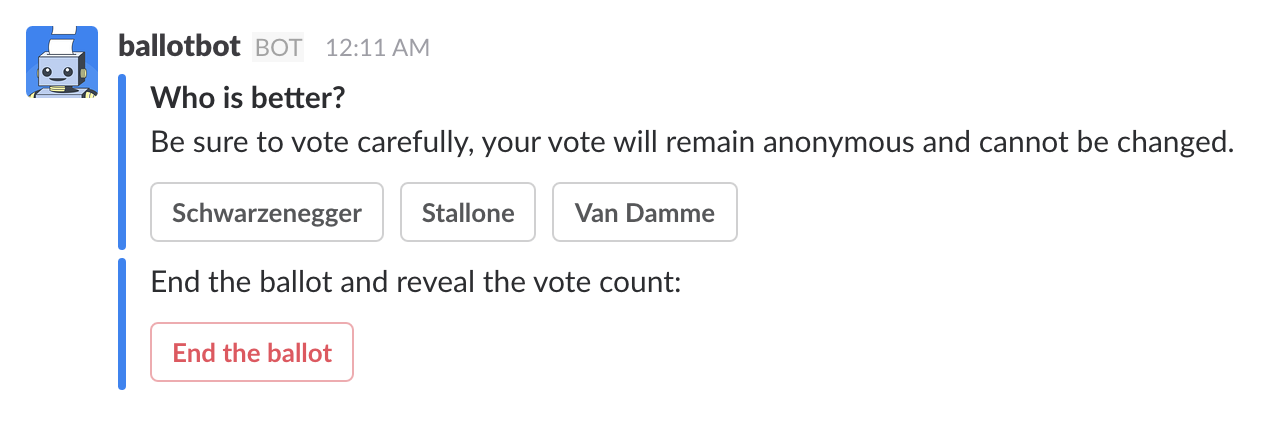
Before getting started you will need to set up a new app over at api.slack.com
- Node.js v8.1.4
- direnv
- yarn
- ngrok
npm i -g ngrok
export CLIENT_ID=<slack-client-id>
export CLIENT_SECRET=<slack-app-secret>
export VERIFICATION_TOKEN=<slack-app-verification-token>
export PORT=4050
Save as .envrc to make use of direnv.
$ yarn install
$ yarn devThis will expose a secure HTTP connection to localhost. You will need to tweak settings in your slack app configuration based on the random URL that ngrok sets up.
$ yarn tunnelVisit http://127.0.0.1:4040/status for an ngrok dashboard.
In src/controller.js set the redirectUri to your local ngrok url, example:
const controller = Botkit.slackbot({
  storage: redis,
  interactive_replies: true,
  debug: false
}).configureSlackApp({
  clientId: process.env.CLIENT_ID,
  clientSecret: process.env.CLIENT_SECRET,
  redirectUri: 'https://foobar.ngrok.io/oauth', // Point to ngrok url
  scopes: ['incoming-webhook', 'bot', 'commands']
})
Inside of app setting on slack.com make sure to alter:
- Interactive Messages > Request URL, e.g.
https://foobar.ngrok.io/slack/receive - OAuth & Permissions > Redirect URL, e.g.
https://foobar.ngrok.io/oauth
These must be changed to point to ngrok rather than Heroku.
Visit https://<your-random-ngrok-url>/login