


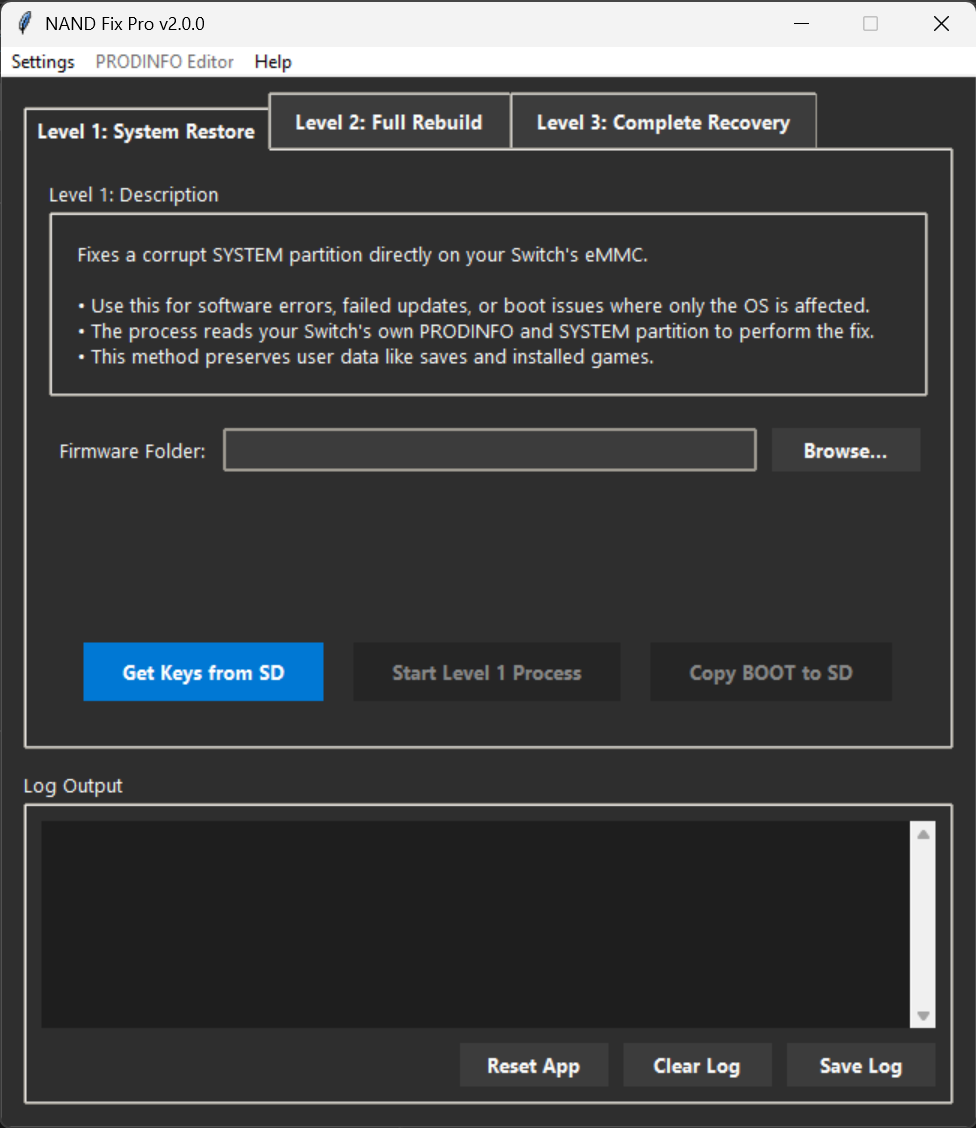
A comprehensive GUI tool for Nintendo Switch NAND repair, designed to simplify complex recovery processes into a user-friendly, step-by-step interface.
NAND Fix Pro provides three distinct levels of repair, from a simple system file restore that preserves your data to a complete NAND reconstruction for catastrophic failures. It automates the use of essential community tools like EmmcHaccGen, NxNandManager, and OSFMount behind a clean and safe interface.
- Three-Tiered Repair System: Choose the right level of repair for your specific issue.
- User-Friendly GUI: A modern, dark-themed interface that guides you through every step. No command-line knowledge required.
- Automatic Path Detection: The application automatically finds its required tools from the
libfolder. - Safety First: Critical actions require user confirmation to prevent accidental data loss. Buttons remain disabled until all required files and paths are correctly configured.
- Erista & Mariko Support: Automatically detects the console model from its PRODINFO and applies the correct settings for boot file generation.
- Automated Dependency Management: The included launcher ensures Python and required libraries are installed automatically.
- Built-in Admin Elevation: Automatically prompts for administrator rights, which are required for direct eMMC access.
- Robust Logging: All operations are logged to the screen and saved in an
error_log.txton crash, making troubleshooting easy. - Disk Space Validation: Automatically checks for sufficient free space (60GB) before starting any repair process.
- What it does: Dumps the SYSTEM partition from your Switch, replaces the core OS files with clean ones generated from your firmware, and flashes it back.
- When to use it: Ideal for fixing boot issues caused by a failed system update, a bad custom theme, or general software corruption where your save games and installed titles are still intact.
- Outcome: Your console's OS is repaired, and all your user data (saves, games, profiles) is preserved.
- What it does: Uses your Switch's unique PRODINFO to rebuild the entire NAND using clean, pre-packaged donor partitions.
- When to use it: Use this when multiple partitions (not just SYSTEM) are corrupt, but your console's PRODINFO is still readable and intact.
- Outcome: Your console is restored to a factory-like state. All user data will be erased.
- New Advanced Option - Fix USER Partition: This level now includes a separate, advanced function to repair only a corrupt USER partition without touching the rest of the OS. This is a faster alternative if your problem is isolated to user data corruption (e.g., being unable to boot past the setup screen). Like the full rebuild, this process will also erase all user data.
- What it does: Reconstructs a complete NAND from scratch using a donor PRODINFO file and a pre-built NAND skeleton. It automatically detects the eMMC size (32GB/64GB) to use the correct template.
- When to use it: This is the final option for a completely dead or lost NAND where even the original PRODINFO is gone or corrupt.
- Outcome: A brand new, functional NAND is written to the eMMC. This is a total overwrite.
Before using this tool, you will need to provide:
- Your Keys File: A
prod.keysfile dumped from your own console. - Firmware Files: A folder containing the extracted firmware for the version you wish to install.
- (Level 3 Only): A decrypted donor
PRODINFOfile if your original is lost.
All other required tools and donor partitions are included in the release package.
- Download the
NAND-Fix-Pro-v2.0.0.exefile from the latest release page. - Important: The downloaded
.exefile is actually a 7-Zip self-extracting archive. When you run it or extract it, Windows Defender may flag theNANDFixPro.exelauncher as a potential threat.
This is a known false positive detection. The NANDFixPro.exe launcher is flagged because it:
- Automatically elevates to administrator privileges
- Installs a portable Python environment
- Executes system-level operations required for eMMC access
The tool is completely safe and open-source. You can review the source code in this repository at any time.
To use NAND Fix Pro, you'll need to add an exclusion to Windows Defender:
- Open Windows Security by searching for it in the Start menu
- Click on Virus & threat protection
- Under "Virus & threat protection settings", click Manage settings
- Scroll down to Exclusions and click Add or remove exclusions
- Click Add an exclusion and select Folder
- Navigate to and select the folder where you plan to extract NAND Fix Pro
- Now extract the
NAND-Fix-Pro-v2.0.0.exeto that folder
If Windows Defender already quarantined the file:
- Open Windows Security
- Go to Virus & threat protection
- Click on Protection history
- Find the
NANDFixPro.exeentry and click on it - Click Actions → Restore
- Then follow Method 1 above to add the folder to exclusions to prevent future detection
- Press
Windows + Ito open Settings - Go to Privacy & Security → Windows Security
- Click Virus & threat protection
- Under "Virus & threat protection settings", click Manage settings
- Scroll to Exclusions → Add or remove exclusions
- Click Add an exclusion → Folder
- Select your NAND Fix Pro installation folder
Getting started is designed to be as simple as possible.
- CRITICAL: Create a full NAND backup using Hekate before doing anything else. This is your essential safety net and must be done regardless of which repair level you plan to use. Without this backup, you cannot recover if something goes wrong.
- Get your unique console files. Use Lockpick RCM to dump your
prod.keysfile. You must copy this file from your Switch's SD card to your computer, as the tool needs it for all operations. - If you're performing a Level 3: Complete Recovery, you will also need a decrypted donor
PRODINFOfile. If you used theprodinfo_gentool to create one, ensure you copy this file to your computer as well. - Prepare a USB cable to connect your Switch to your computer.
- Boot your Switch into Hekate.
- Navigate to the USB Tools menu.
- Ensure the "Read-only" option is disabled. This will allow the tool to write to your eMMC.
- Select eMMC RAW GPP. This makes your Switch's eMMC accessible to your computer.
- Download the
NAND-Fix-Pro-v1.0.0.zipfile from the latest release page. - Extract the entire contents of the ZIP file to a folder on your computer.
- Simply double-click the
NANDFixPro.exefile.
The launcher will automatically perform a one-time setup:
- It will install an embedded, portable version of Python.
- It will install the necessary Python dependencies (
wmi). - It will then start the NAND Fix Pro application for you.
- After the tool generates the new
boot0andboot1files, you must flash them to your console. - Copy the generated
boot0andboot1files into thebackup/<your-emmc-id>/restorefolder on your Switch's SD card. The<your-emmc-id>is a unique alphanumeric ID based on your eMMC chip, for example,e4ff5e48. - In Hekate, go to the Tools section. Select Restore eMMC, then choose eMMC BOOT0 & BOOT1 to flash these files back to your console.
The tool relies on a specific folder structure to function correctly. Ensure your extracted folder looks like this:
NAND-Fix-Pro/
│
├── NANDFixPro.exe
├── nandfixpro.py
│
└───lib/
    ├── 7z/
    │   └── 7z.exe
    ├── EmmcHaccGen/
    │   └── EmmcHaccGen.exe
    ├── NxNandManager/
    │   └── NxNandManager.exe
    │
    └───NAND/
        ├── donor32.7z
        ├── donor64.7z
        ├── PRODINFOF.7z
        ├── SAFE.7z
        ├── SYSTEM.7z
        ├── USER-32.7z
        └── USER-64.7z
This tool interacts directly with your console's internal memory (eMMC). While it includes safety measures, any interruption during a write process (e.g., power loss, cable disconnection) or use of incorrect files can lead to a permanent brick.
- You are using this tool at your own risk.
- Always make a full NAND backup with Hekate before attempting any repairs.
- The author is not responsible for any damage to your console.
This application is a graphical frontend that would not be possible without the foundational work of these incredible tools and the teams behind them:
- EmmcHaccGen by suchmememanymuch
- NxNandManager by eliboa
- OSFMount by PassMark Software
- 7-Zip by Igor Pavlov
If you find this project useful, please consider supporting me by buying me a coffee!

