Light weight Terminal User Interface (TUI) to pick material colors. You do NOT need to take your hands off the keyboard to pick colors.
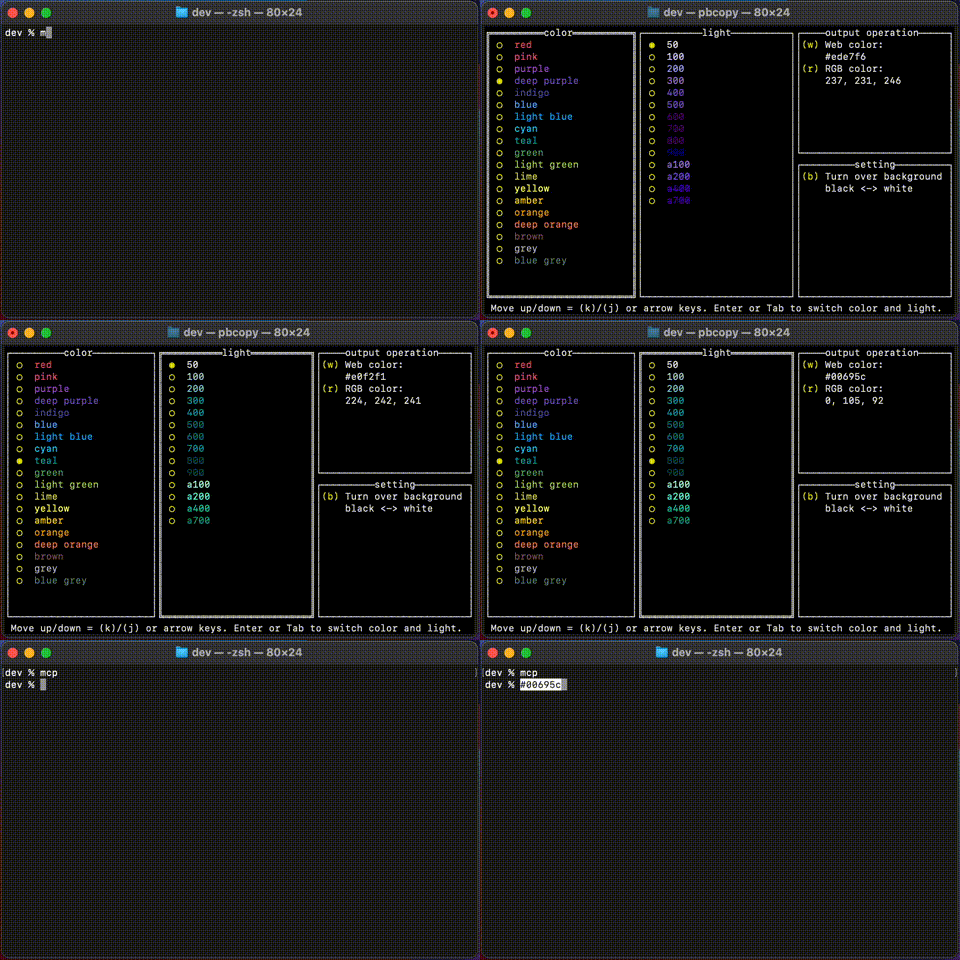

Here, I introduce two methods. If go is installed, the first method would be more convenient.
go install github.com/tenkoh/mcpick- add
$GOPATH/binto$PATH
- Save the binary file
mcpickin any directory. The binary files are listed on release page. - Add the path to PATH.
- Select color and light which you like.
- Move up/down by
k/jor arrow keys - Switch color and light by
EnterorTab
- Move up/down by
- Select output style. Note: after hit the key, this app immediately closes.
w: web color style (#ffffff)r: rgb color style (255, 255, 255)
- Hit
bto switch background color. - Hit
Ctrl + Cto quit.
This app JUST outputs color code to the terminal. You can combinate this app with others like pbcopy in MacOS or clip in Windows.
The example below copies color code to the clipboard. The most convenient way is make alias in your .bashrc or .zshrc.
alias mcp='mcpick | pbcopy'The example below copies color code to the clipboard. The most convenient way is make .bat file and add the path to PATH.
# mcp.bat
mcpick | clipI'm really welcome your contribution.