
Realization of a partial distance selling platform adapted to the constraints of the Algerian market .


- AMAR BENSABER MOHMAED
- AZZAZ RAHMANI OUSSAMA
- BOUSSEKAR KACEM
- GOUMEIDA AHMED SEYF-EDDINE
- IFFEROUDJENE MOULOUD
- MESSABIH OUSSAMA
7anoTech was developed to be mainly deployed using Docker, the following instructions will guide you to deploy 7annoTech on a machine that has Docker already installed. Please visit this link if you don't have Docker installed yet.
Getting a local instance of 7annoTech up and running is very quickly using docker-compose
1 - Clone the repository and cd to the project folder:
$ git clone https://github.com/th3happybit/7anooTech
cd 7anooTech
2 - Mount the app directory and install the dependencies:
$ sudo chown -R www-data:www-data 'LocalAppPath'
'LocalAppPath' ex: ~/7anooTech
3 - copy the config file:
$ cp .env.example.docker .env4 - Mount the app directory and install the dependencies:
$ docker run --rm -v $(pwd):/app composer install --no-dev5 - Build the app image and run the services:
$ docker-compose up -dIt should take some time the first time your run this command (it depends on your connection), docker images will be pulled and built.
At the time that you start the server, your machine should have port 80 listening to receive HTTP requests.
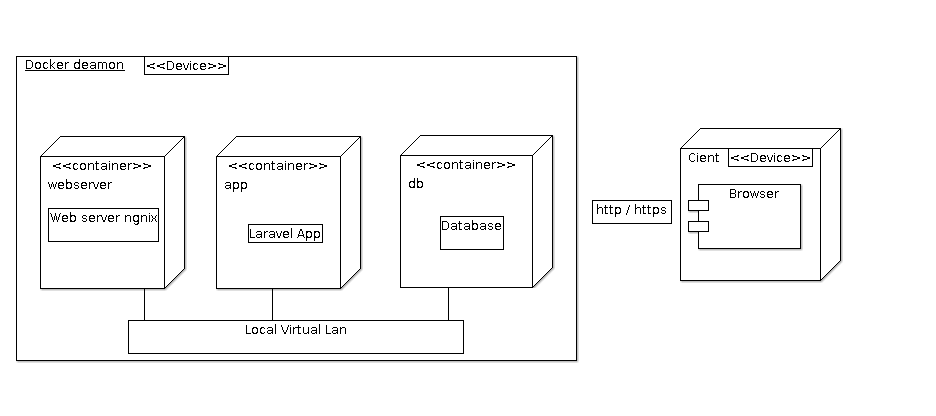
The Docker Daemon should start 3 containers when you run docker-compose : app, db and webserver.
-
app is the container that is contains the Laravel application.
-
db is running a mysql image, the MySQL database is used by the web app to store many information. The server is not binding any port to this container.
-
webserver is running a nginx image, used to run the web server that's gonna serve the app in ports 443, 80.
All this containers are connected together in a local virtual LAN and can't be accessed from the outside unless a port is binded.
-
edit
/etc/php/php.iniand uncommentextension=mysqli.so extension=pdo_mysql.so -
clone this repository
git clone https://github.com/th3happybit/7annoTech.git -
navigate to the project folder
-
run
composer installon your terminal -
copy
.env.examplefile to.envon the project folder -
open your
.envfile and change the database name DB_DATABASE to whatever you have, username DB_USERNAME and password DB_PASSWORD field correspond to your configuration. On XAMPP, by default the user isrootand the password is empty -
run
php artisan key:generate -
run
php artisan migrate --seed -
run
php artisan storage:link -
run
php artisan serve
- username : admin
- email = admin@email.com
- password = secret
- run
composer install - run
sudo cp vendor/h4cc/wkhtmltopdf-amd64/bin/wkhtmltopdf-amd64 /usr/local/bin/wkhtmltopdf - run
sudo chmod +x /usr/local/bin/wkhtmltopdf - if it didn't work contact me (renken) and/else read the official installation guide