-
Notifications
You must be signed in to change notification settings - Fork 0
feat: n8n community node for TinyFish Web Agent #5
New issue
Have a question about this project? Sign up for a free GitHub account to open an issue and contact its maintainers and the community.
By clicking “Sign up for GitHub”, you agree to our terms of service and privacy statement. We’ll occasionally send you account related emails.
Already on GitHub? Sign in to your account
Closed
Closed
Changes from all commits
Commits
Show all changes
4 commits
Select commit
Hold shift + click to select a range
51a7458
feat: n8n community node for TinyFish Web Agent
pranavjana d05f579
fix: update node category and description for n8n panel visibility
pranavjana 286c408
fix: remove setTimeout/clearTimeout to pass n8n community node scan
pranavjana 4bbdad6
fix: resolve n8n community node pre-check failures
pranavjana File filter
Filter by extension
Conversations
Failed to load comments.
Loading
Jump to
Jump to file
Failed to load files.
Loading
Diff view
Diff view
There are no files selected for viewing
This file contains hidden or bidirectional Unicode text that may be interpreted or compiled differently than what appears below. To review, open the file in an editor that reveals hidden Unicode characters.
Learn more about bidirectional Unicode characters
| Original file line number | Diff line number | Diff line change |
|---|---|---|
| @@ -0,0 +1,4 @@ | ||
| node_modules/ | ||
| dist/ | ||
| *.js.map | ||
| .DS_Store |
This file contains hidden or bidirectional Unicode text that may be interpreted or compiled differently than what appears below. To review, open the file in an editor that reveals hidden Unicode characters.
Learn more about bidirectional Unicode characters
| Original file line number | Diff line number | Diff line change |
|---|---|---|
| @@ -0,0 +1,21 @@ | ||
| MIT License | ||
|
|
||
| Copyright (c) 2026 Tiny Fish, Inc. | ||
|
|
||
| Permission is hereby granted, free of charge, to any person obtaining a copy | ||
| of this software and associated documentation files (the "Software"), to deal | ||
| in the Software without restriction, including without limitation the rights | ||
| to use, copy, modify, merge, publish, distribute, sublicense, and/or sell | ||
| copies of the Software, and to permit persons to whom the Software is | ||
| furnished to do so, subject to the following conditions: | ||
|
|
||
| The above copyright notice and this permission notice shall be included in all | ||
| copies or substantial portions of the Software. | ||
|
|
||
| THE SOFTWARE IS PROVIDED "AS IS", WITHOUT WARRANTY OF ANY KIND, EXPRESS OR | ||
| IMPLIED, INCLUDING BUT NOT LIMITED TO THE WARRANTIES OF MERCHANTABILITY, | ||
| FITNESS FOR A PARTICULAR PURPOSE AND NONINFRINGEMENT. IN NO EVENT SHALL THE | ||
| AUTHORS OR COPYRIGHT HOLDERS BE LIABLE FOR ANY CLAIM, DAMAGES OR OTHER | ||
| LIABILITY, WHETHER IN AN ACTION OF CONTRACT, TORT OR OTHERWISE, ARISING FROM, | ||
| OUT OF OR IN CONNECTION WITH THE SOFTWARE OR THE USE OR OTHER DEALINGS IN THE | ||
| SOFTWARE. |
This file contains hidden or bidirectional Unicode text that may be interpreted or compiled differently than what appears below. To review, open the file in an editor that reveals hidden Unicode characters.
Learn more about bidirectional Unicode characters
| Original file line number | Diff line number | Diff line change |
|---|---|---|
| @@ -0,0 +1,167 @@ | ||
| # TinyFish Web Agent Node for n8n | ||
|
|
||
| ## Overview | ||
|
|
||
| [TinyFish Web Agent](https://docs.mino.ai/) enables enterprises, builders, and developers to deploy AI agents that navigate real sites, complete real workflows across authenticated systems and dynamic interfaces, and return structured operational intelligence - through our visual platform or API. At scale. Reliably. | ||
|
|
||
| ## Configuration | ||
|
|
||
| ### 1. Install TinyFish Web Agent Node | ||
|
|
||
| In your n8n instance, go to **Settings > Community Nodes** and install: | ||
|
|
||
| ```text | ||
| n8n-nodes-tinyfish | ||
| ``` | ||
|
|
||
| Or install via npm in a self-hosted instance: | ||
|
|
||
| ```bash | ||
| npm install n8n-nodes-tinyfish | ||
| ``` | ||
|
|
||
| ### 2. Create a TinyFish Web Agent API Key | ||
|
|
||
| Visit [TinyFish Dashboard](https://agent.tinyfish.ai/api-keys) and generate your API key. | ||
|
|
||
| ### 3. Authorize TinyFish Web Agent | ||
|
|
||
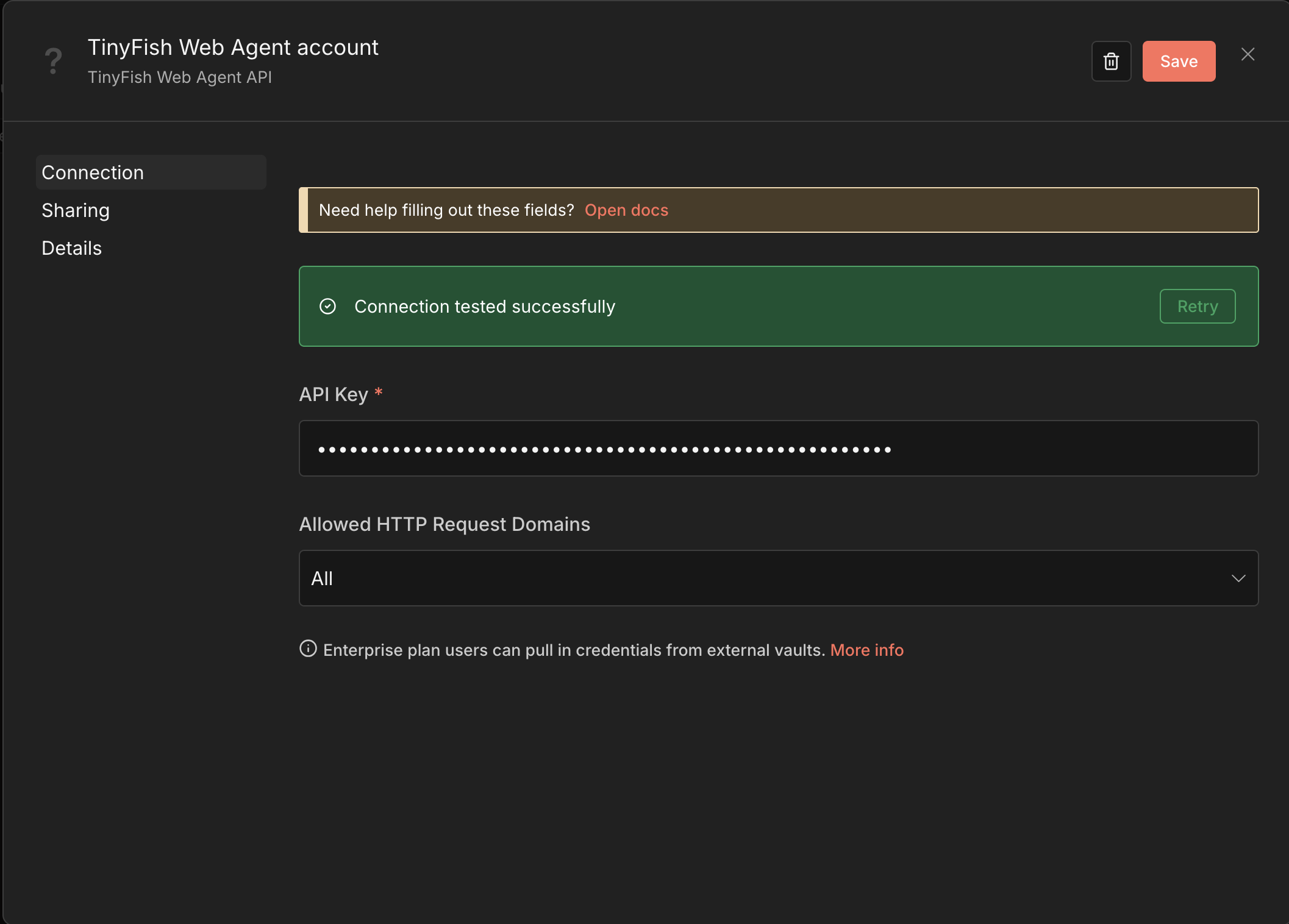
| Add the **TinyFish Web Agent** node to a workflow, click the **Credential** dropdown, and select **Create New Credential**. Paste your API key and click **Save**. | ||
|
|
||
|  | ||
|
|
||
| ## Workflow Usage | ||
|
|
||
| Integrate TinyFish Web Agent into your pipeline by following these steps: | ||
|
|
||
| 1. Add the **TinyFish Web Agent** node to your workflow. | ||
| 2. Select an operation and fill in the **URL** and **Goal** fields. | ||
| 3. Run the workflow to extract any information from a web page. | ||
|
|
||
| <p align="center"> | ||
| <img src="https://raw.githubusercontent.com/tinyfish-io/tinyfish-web-agent-integrations/main/n8n/_assets/node_configuration.png" alt="Node Configuration" width="400"> | ||
| </p> | ||
|
|
||
| For example, to extract the top headlines from Hacker News: | ||
|
|
||
| - **URL:** `https://news.ycombinator.com` | ||
| - **Goal:** `Get the top 5 headlines with their scores and comment counts. Return as a JSON array with keys: title, score, comments.` | ||
|
|
||
| The node returns structured JSON: | ||
|
|
||
| ```json | ||
| { | ||
| "status": "COMPLETED", | ||
| "runId": "run_abc123", | ||
| "streamingUrl": "https://...", | ||
| "resultJson": [ | ||
| { "title": "Show HN: ...", "score": 142, "comments": 58 }, | ||
| { "title": "Launch HN: ...", "score": 98, "comments": 33 } | ||
| ] | ||
| } | ||
| ``` | ||
|
|
||
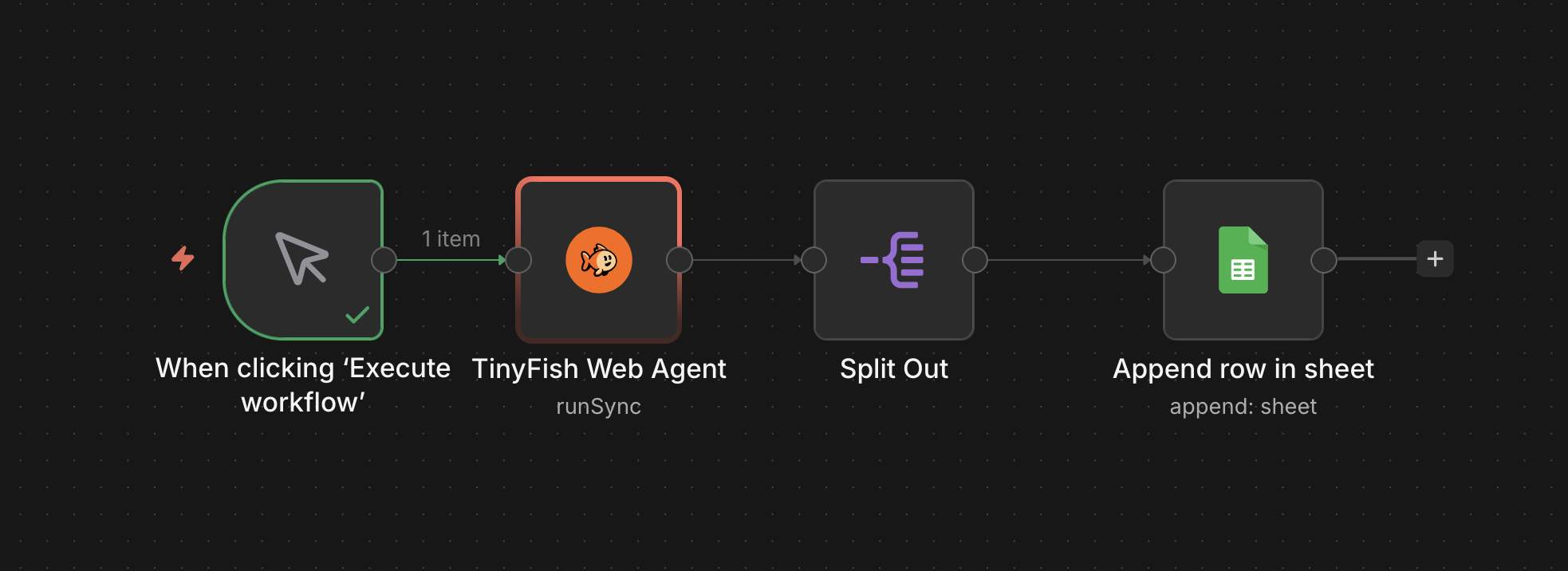
| The structured output can be piped into downstream n8n nodes — split the results, send Slack alerts, append rows to Google Sheets, or feed data into any other integration. | ||
|
|
||
|  | ||
|
|
||
| ## Agent Usage | ||
|
|
||
| This node is compatible with n8n's AI Agent via `usableAsTool`. Give your agent the ability to browse the live web, extract data, and act on it. | ||
|
|
||
| 1. Add the **TinyFish Web Agent** node to your workflow as a tool. | ||
| 2. Prompt the Agent to perform web automations using natural language. The Agent will fill in the URL and Goal automatically. | ||
|
|
||
| **Example prompts:** | ||
|
|
||
| - `"Extract the blog post titles and authors from https://example.com/blog"` | ||
| - `"Go to https://example.com/pricing and extract all plan names and prices"` | ||
| - `"List my recent automation runs that have completed"` | ||
|
|
||
| ## Operations | ||
|
|
||
| | Operation | Description | | ||
| |---|---| | ||
| | **Run (SSE Streaming)** | Execute automation with real-time streaming and return the final result. Recommended for most use cases. | | ||
| | **Run (Sync)** | Execute automation and wait for the complete result in a single response. | | ||
| | **Run (Async)** | Start automation and return a run ID immediately. Use with **Get Run** to poll for results. Best for batch processing multiple URLs in parallel. | | ||
| | **Get Run** | Get the status and result of an automation run by ID. | | ||
| | **List Runs** | List previous automation runs with optional status filter. | | ||
|
|
||
| ## Options | ||
|
|
||
| All run operations support the following optional settings under **Add Option**: | ||
|
|
||
| | Option | Default | Description | | ||
| |---|---|---| | ||
| | **Browser Profile** | `Lite` | Choose between `Lite` (fast, for standard sites) and `Stealth` (anti-detection mode for sites protected by Cloudflare, DataDome, CAPTCHAs, etc.). Start with Lite and switch to Stealth if you get blocked or see access denied errors. | | ||
| | **Enable Proxy** | Off | Route the browser through a geographic proxy. Recommended when using Stealth mode on geo-restricted or bot-protected sites. Available countries: US, GB, CA, DE, FR, JP, AU. | | ||
| | **Proxy Country** | US | Select the geographic location for the proxy. Only shown when Enable Proxy is turned on. Choose the country closest to the target site's expected region for best results. | | ||
| | **Timeout** | 300s | Maximum time to wait for the automation to complete (30–600 seconds). Most tasks complete within 60–120 seconds. Increase for complex multi-step workflows like pagination or form filling. | | ||
|
|
||
| ## Use Cases | ||
|
|
||
| - **Competitive Price Monitoring:** Extract pricing data from competitor product pages in parallel and feed it into downstream n8n nodes (e.g., Slack alerts, Google Sheets). | ||
| - **AI Agent Web Access:** Give your n8n AI Agent the ability to browse the live web, extract data, and act on it. | ||
| - **Lead Generation:** Run agents in parallel across a list of company URLs to extract contact information into a structured format. | ||
|
|
||
| ## Contributing | ||
|
|
||
| We love getting contributions! To get started, here's how to set up development for the TinyFish Web Agent n8n Node: | ||
|
|
||
| ### 1. Fork this repository | ||
|
|
||
| ### 2. Clone the repository | ||
|
|
||
| Clone the forked repository from your terminal: | ||
|
|
||
| ```shell | ||
| git clone git@github.com:<github_username>/tinyfish-web-agent-integrations.git | ||
| ``` | ||
|
|
||
| ### 3. Install dependencies | ||
|
|
||
| ```shell | ||
| cd n8n | ||
| npm install | ||
| ``` | ||
|
|
||
| ### 4. Build and link for local testing | ||
|
|
||
| ```shell | ||
| npm run build | ||
| npm link | ||
| ``` | ||
|
|
||
| Then in your n8n installation directory: | ||
|
|
||
| ```shell | ||
| npm link n8n-nodes-tinyfish | ||
| ``` | ||
|
|
||
| Restart n8n to load the node. | ||
|
|
||
| ### 5. Make your changes and save | ||
|
|
||
| ### 6. Ensure the node works | ||
|
|
||
| Rebuild and restart n8n after each change: | ||
|
|
||
| ```shell | ||
| npm run build | ||
| # restart n8n | ||
| ``` | ||
|
|
||
| ### 7. Submit a Pull Request | ||
|
|
||
| After confirming that the node works properly, submit a pull request to the `main` branch of this repository. If you run into issues like merge conflicts or don't know how to open a pull request, check out [GitHub's pull request tutorial](https://docs.github.com/en/pull-requests/collaborating-with-pull-requests). | ||
|
|
||
| ## Resources | ||
|
|
||
| - [Documentation](https://docs.mino.ai/) | ||
| - [Cookbook](https://github.com/tinyfish-io/tinyfish-cookbook) | ||
| - [Templates](https://agent.tinyfish.ai/examples) | ||
|
|
||
| ## Support | ||
|
|
||
| Need help or have a question while using or contributing to the node? File a GitHub issue. | ||

Loading
Sorry, something went wrong. Reload?
Sorry, we cannot display this file.
Sorry, this file is invalid so it cannot be displayed.

Loading
Sorry, something went wrong. Reload?
Sorry, we cannot display this file.
Sorry, this file is invalid so it cannot be displayed.

Loading
Sorry, something went wrong. Reload?
Sorry, we cannot display this file.
Sorry, this file is invalid so it cannot be displayed.
This file contains hidden or bidirectional Unicode text that may be interpreted or compiled differently than what appears below. To review, open the file in an editor that reveals hidden Unicode characters.
Learn more about bidirectional Unicode characters
| Original file line number | Diff line number | Diff line change |
|---|---|---|
| @@ -0,0 +1,47 @@ | ||
| import type { | ||
| IAuthenticateGeneric, | ||
| ICredentialTestRequest, | ||
| ICredentialType, | ||
| INodeProperties, | ||
| } from 'n8n-workflow'; | ||
|
|
||
| export class TinyfishApi implements ICredentialType { | ||
| name = 'tinyfishApi'; | ||
|
|
||
| displayName = 'TinyFish Web Agent API'; | ||
|
|
||
| icon = 'file:tinyfish.svg' as const; | ||
|
|
||
| documentationUrl = 'https://docs.mino.ai'; | ||
|
|
||
| properties: INodeProperties[] = [ | ||
| { | ||
| displayName: 'API Key', | ||
| name: 'apiKey', | ||
| type: 'string', | ||
| typeOptions: { password: true }, | ||
| default: '', | ||
| required: true, | ||
| description: | ||
| 'Your TinyFish Web Agent API key. Get one at https://agent.tinyfish.ai/api-keys.', | ||
| }, | ||
| ]; | ||
|
|
||
| authenticate: IAuthenticateGeneric = { | ||
| type: 'generic', | ||
| properties: { | ||
| headers: { | ||
| 'X-API-Key': '={{$credentials.apiKey}}', | ||
| }, | ||
| }, | ||
| }; | ||
|
|
||
| test: ICredentialTestRequest = { | ||
| request: { | ||
| baseURL: 'https://agent.tinyfish.ai', | ||
| url: '/v1/runs', | ||
| method: 'GET', | ||
| qs: { limit: '1' }, | ||
| }, | ||
| }; | ||
| } |
Oops, something went wrong.
Add this suggestion to a batch that can be applied as a single commit.
This suggestion is invalid because no changes were made to the code.
Suggestions cannot be applied while the pull request is closed.
Suggestions cannot be applied while viewing a subset of changes.
Only one suggestion per line can be applied in a batch.
Add this suggestion to a batch that can be applied as a single commit.
Applying suggestions on deleted lines is not supported.
You must change the existing code in this line in order to create a valid suggestion.
Outdated suggestions cannot be applied.
This suggestion has been applied or marked resolved.
Suggestions cannot be applied from pending reviews.
Suggestions cannot be applied on multi-line comments.
Suggestions cannot be applied while the pull request is queued to merge.
Suggestion cannot be applied right now. Please check back later.
There was a problem hiding this comment.
Choose a reason for hiding this comment
The reason will be displayed to describe this comment to others. Learn more.
Docs mismatch: Timeout option isn’t present in the node UI.
The README still documents a Timeout option, but the node’s options no longer include it. Please remove or reintroduce the option for consistency.
📝 Suggested doc update
-| **Timeout** | 300s | Maximum time to wait for the automation to complete (30–600 seconds). Most tasks complete within 60–120 seconds. Increase for complex multi-step workflows like pagination or form filling. |📝 Committable suggestion
🤖 Prompt for AI Agents