API
##Contents
All API is available only through the test object. It can be called directly, or after the other functions.
I advise you to read named parameter idiom (method chaining)
Since testit - testing framework, everything is based on tests and their grouping.
Tests are a fundamental functional of the testit framework.
They all:
- check some received value or values;
- can receive the exact number of arguments (return an error instead, if there was more or less arguments than expected);
- can be
passed,failedand ended witherror - add their results to the current level stack.
The output of each test looks like:

Each passed test is collapsed by default. In the screenshot it's showed as uncollapsed to look more representative
The first line consists of
-
status- displays the result of a test (passed,failedorerror); -
comment- a user-defined text
The second line may consist of:
-
description- a text which describes the test type and the result -
error- some type of error signifying that arguments in a test are incorrectError displays:
-
type- the type of error:-
RangeError- there are more or fewer arguments than expected -
TypeError- the type of one or more arguments is incorrect
-
-
message- describes an error -
trace- the result oftest.trace() -
error object- a real error if you need more details
-
The last line consists of:
-
arguments- the array of the received arguments.
#####There is a list of all available tests (v.1.2.0):
if ( value ) {return 'pass'} else {return 'fail'}So each value which will passes if - will pass test.it( value ).
// The next tests will pass
test.it( 1 );
test.it( 'text' );
test.it( true );
test.it( window );
test.it( alert );
test.it( 2+2 === 4 );
var a = 10;
test.it( a > 5 );

// The next tests will fail
test.it( 0 );
test.it( '' );
test.it( false );
test.it( null );
test.it( NaN );
test.it( 2+2 === 5 );
var a = 3;
test.it( a > 5 );

// The next lines will return an error
test.it( );
test.it( 1, 2, 3 );

// The next line will throw the ReferenceError and will not be executed
test.it( myNotDefinedVariable );
test.it( myNotDefinedFunction() );-
test.them( values )- checks for non-false value all elements in thevaluesarray.It is the plural form of
test.it( value )
// The next tests will pass
test.them( [1,'text', true, window,alert] )

// The next tests will fail
test.them( [1,'text', false, window,alert,] )

// The next lines will return an error
test.them( )
test.them( 1 )
test.them( 1, 2 )
test.them( [1,2], 2 )-
test.it( value1, value2 )- checks the equality betweenvalue1&value2.This is not just
value1 == value2. ThedeepCompare()function is used here. Look at it on stackoverflow. It can compare any types of values. Obviously they must be of the same type.
// The next tests will pass
test.it( 5, 5 )
test.it( 'text', 'text' )
test.it( [1,2,3], [1,2,3] )
test.it( {a:1,b:2}, {a:1,b:2} )

// The next tests will fail
test.it( 5, 1 )
test.it( 'text', 'line' )
test.it( '10', 10 )
test.it( [1,2,3], [3,2,1] )
test.it( {a:1,b:2}, {a:1,b:2,c:3} )-
test.is( value, constructor )- checks constructor ofvalueto be equal to theconstructor.The simplest example of this test usage - verify type of
value.
// The next tests will pass
test.is( 1, Number );
test.is( 'text', String );
test.is( alert, Function );
function constr(){};
var instance = new constr;
test.is( instance, constr );

// The next tests will fail
test.is( 1, String );
test.is( instance, Object );

// The next lines will return an error
test.is( );
test.is( 1 );
test.is( 1, 2 );
test.is( 1, notDefinedConstructor );
test.is( 1, Number, 3 );-
test.are( values [, constructor] )- checks the equality between the constructors of all elements in thevaluesarray. If theconstructoris defined - the constructors of elements will be compared with it.It is the plural form of test.is()
// The next tests will pass
test.are( [1,2,3,new Number()] );
test.are( [1,2], Number );
test.are( ['asd','dsa'], String );

// The next tests will fail
test.are( [1,2,'text'] );
test.are( ['asd','dsa'], Number );

// The next lines will return an error
test.are( );
test.are( 1 );
test.are( 1, 2 );
test.are( 1, Number );
test.are( [1,2], notDefinedType );
test.are( [1,2], Number, 3 );
Groups are an extremely useful tool, which allows multi-level combining of tests.
Like tests, they:
- can be
passed,failedand ended witherror- it depends on the worst result in their stack - add their result to the current level stack.
The output of groups looks like:

Each passed group is collapsed by default. In the screenshot they are shown as uncollapsed to look more representative
The first line:
-
name- a user-defined name of the group. -
status- can bepassed,failedorerror. -
counters- numbers separated by/signify the number of passed, failed and error tests/groups. -
time- time in milliseconds spent on executing code in this group. -
comment- a user-defined text.
The second and following lines represent the stack of this group, it may consist of another groups and tests.
-
test.group( name, function(){ ... } )- makes a new group, or add new code to exist group whith thatname.
// will make the group 'first group'
test.group('first group',function(){
    // ... here go the first tests
});

// adds tests to the group 'first group'
test.group('first group',function(){
    // ... here go the second tests
});
The code above is similar to:
// will make the group 'first group'
test.group('first group',function(){
    // ... here go the first tests
    // ... here go the second tests
});-
test.group( name )- returns link to thegroupobject by it'sname.Provides a transit to the next-level group
// will make the group
test.group('first group',function(){
    // ... here go the first tests
});

// returns the link to the group 'group in first group'
test.group('first group')test.group provides multi-level nesting. test.group( name, function(){ ... } ) can be nested in another test.group( name, function(){ ... } ) like this:
// will make the group with a group in it
test.group('first group',function(){
    // ... here go the first tests
    test.group('group in first group',function(){
        // ... here go the second tests
    });
    // ... here go the third tests
});
With test.group( name ) you can use nesting in this way
// will make the group with a group in it
test.group('first group',function(){
    // ... here go the first tests
    test.group('group in first group',function(){
        // ... here go the second tests
    });
    // ... here go the  third tests
});

// adds tests to the group 'group in first group'
test.group('first group')
    .group('group in first group',function(){
    // ... here go the fourth tests
});
The code above is similar to:
// will make the group with a group in it
test.group('first group',function(){
    // ... here go the first tests
    test.group('group in first group',function(){
        // ... here go the second tests
        // ... here go the fourth tests
    });
    // ... here go the third tests
});
A group throws an error if it receives 0 or more than 2 arguments, or if there is only 1 argument with a non-existing name:
test.group( );
test.group('wrong group',function(){
    test.it(true);
},3);
test.group('non existing group');Modifiers can intensify tests and groups. And endows it with additional functions. All of them calls in chain with selected test or group. Some (prior) must be called before. Other (common) - after. And few of them (final) - must be the last call in chain.
test.group('first group',function(){
    test.it(true).comment('test with true argument');
}).comment('group with only one test');-
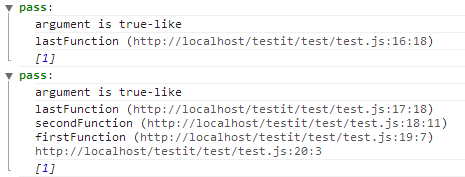
.addTrace( [level] )- adds trace to a test/group.level- Number of trace lines which will be addedif
levelundefined - all trace will be added.example:
(function firstFunction() {
    (function secondFunction() {
        (function lastFunction() {
            test.it(1).addTrace(0); // adds only curent line
            test.it(1).addTrace();  // adds every lines of trace
        })();
    })();
})();
-
.callback( funcIfpass[, funcIffail[, funcIferror]])- will executefuncIfpassif a test or group passes,funcIffailif it fails,funcIferrorif it causes an error.funcIffailandfuncIferrorare not required.
// will cause two alerts: 'test pass' - the first one, and 'group pass' - the following one
test.group('first group',function(){
    test.it(true).callback(function(){alert('test pass')}
                          ,function(){alert('test fail')}
                          ,function(){alert('test error')});
}).callback(function(){alert('group pass')}
           ,function(){alert('group fail')}
,function(){alert('group error')});-
.addTime- adds spended time to the testNotice: group show spended time by default. This modifier works only with tests
example
test.addTime().it(someThing());
-
.excludeor.x- makes test or group unpushable into stack of current level group..xis alias to.exclude.This modifier should be the first call in chain, right after
testobject. Is reasonable to use it with final modifiers.example
alert(test.exclude.it(someThing).result()); // will alert true/false
test.x.group('some group',function(){ ... }).print(); // will output group into consoleThat class of modifiers should be the last call in chain. They do not provide chaining.
-
.arguments()- returns a single argument or an array of arguments from the test (not from a group!)This is the only Chain-closer that can't be used in chains that start with
test.group, because groups don't save their arguments in an arguments array.
// will cause the alert: 'test true'
alert('test '+test.it(true).arguments());

// even if a test causes an error, there will be an alert: 'test 1,2,3'
alert('test '+test.it(1,2,3).arguments());-
.result()- returns the result of a test/groupThe returned value has
booleantype.-
true- if test/group is passed -
false- otherwise
-
// will cause two alerts: 'test true' - the first one, and 'group true' - the following one
alert('group '+test.group('first group',function(){
    alert('test '+test.it(true).result());
}).result());
Calling .result() only with test object can be used in CI (Continuous integration). Obviously it's return true if all tests and groups pass.
return test.result();-
.print( [otherPrinter] )- outputs test or group results via defaultprinter. IfotherPrinterdefined - outputs via him.
test.group('first group',function(){
    test.it(someThing).print(); // outputs the test
}).print(); // outputs the first group

// there are another way to output groups
test.group('first group').print(); // outputs the first group
if it's was called directly from test object - outputs group of curent scope.
test.group('first group',function(){
    // ... here goes the tests

    test.print(); // outputs the first group
});
The common way - to call this method after all tests and groups.
example:
var a = 1;
var b = 2;
test.it(a+b === 3);

test.print(); // outputs all result via default printer
Output via other printer
test.print(otherPrinter); // outputs all result via otherPrinterThere are modifiers-chaining availible. So you can use chains like this.
test.addTime().it(some)
     .comment('comment to test')
     .callback(function(){alert('test has been passed')})
     .arguments(); // -> [some]
test.x.group('excluded group', function(){ ... })
     .comment('comment to group')
.result(); // -> true/false-
test.getRoot()- returns a zero-level group.All results will get in it. Any type of output is based on it.
An empty root has the structure:
{
    type: "group",
    name: "root",
    status: undefined,
    time: 0,
    result: {
        pass: 0,
        fail: 0,
        error: 0,
        total: 0
    },
    stack: []
}
Every test located outside the groups and the first-level groups will get into root.stack.
When any test/group gets into any stack, the result counters and the status of the current and all previous levels (till root) are updated. But the counters of the result mean the number of test/groups in the current level only.
-
test.printer( new printer )- change default output to specified inprinterstrategy.It used in initial part of tests. See examples on etc page.
This method provide changing strategy of output. Read more about Strategy Pattern [wiki]
They do not produce any tests or tests manipulations. There are some useful functions, which are used in the core of testit framework.
-
test.typeof( value )- determines and returns the type ofvalue.It recognizes
Array,Boolean,Date,Error(EvalError,RangeError,ReferenceError,SyntaxError,TypeError,UriError),Function,NaN&Number,Object,RegExp,String,Window,HTML,NodeList.
test.typeof(1); // -> Number
test.typeof(NaN); // -> NaN
test.typeof(Infinity); // -> Number
test.typeof('text'); // -> String
test.typeof(window); // -> Window
test.typeof(null); // -> null
test.typeof(document); // -> HTML-
test.trace()- returns the list (joined by "\n") of lines in your code that were performed to call the current line.It is not a true
trace()because any links to the code lines of thetest.itframework were removed from the results
(function firstFunction(){
    (function secondFunction(){
        console.log(test.trace());
    })()
})()
The code above will put into Chrome console the next lines:
secondFunction (http://path/to/script.js:3:26)
firstFunction (http://path/to/script.js:4:7)
http://path/to/script.js:5:3