This is a repository to host the ROS code that is used to operate the ROV. A team of Tyler Burnham and Andrew Buff worked on the code to change it into ROS in the Spring of 2016. It now operates on a laptop and a Raspberry Pi. The code runs with four seperate ros nodes. Talker sends commands to listener which is the command queue. Commander reads messages off of listener and sends the correct movement values to the arduino.

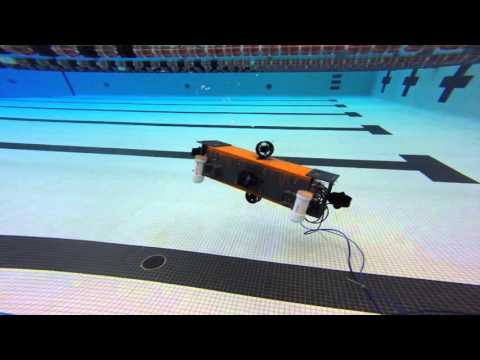
The purpose of this project is to construct a fully autonomous ROV (Remotely Operated Vehicle) that can be used for underwater surveillance. ROVs have the potential to serve a large role in underwater exploration and surveillance. Human undersea exploration and surveillance can be a very dangerous activity. A variety of factors can cause an underwater environment to be dangerous to a human diver, including water pressure, insufficient supply of oxygen, and hostile wildlife. Currently, modern ROVs are being used to provide safer alternatives. ROVs can fit in smaller and more dangerous places that are unsuitable for humans. This project is intended as one of Mercer’s first steps toward an underwater autonomous platform.
The following is an abbreviated install procedure. See the wiki page for the full procedure.
The following is a list of the software needed to install and run the code.
- Laptop - Kubuntu Trusty (14.04)
- Raspberry PI 2 - Ubuntu 14.04 LTS for ARM
- ROS - Jade Turtle
- Rosserial
- Rosserial - Version 0.7.1
- Rosserial_Python - Version 0.7.1
- Rosserial_Arduino - Version 0.7.1
- ROS OpenCV - Version 3.1
- ROS BridgeCV - Version 1.11.12
The following software is not required but was used in the installation and deployment of the code.
- SSH Server
- Vim
- Arduino IDE
See the wiki page for full installation instructions.
This project was created and tested on Kubuntu Trusty (14.04).
Link to download: http://cdimage.ubuntu.com/kubuntu/releases/14.04/release/
Installation Guide: https://help.ubuntu.com/community/Installation
This project was created and tested on Ubuntu 14.04 LTS for ARM.
Link to image download and installation guide: https://wiki.ubuntu.com/ARM/RaspberryPi
ROS Installation Guide: http://wiki.ros.org/jade/Installation/Ubuntu.
sudo sh -c 'echo "deb http://packages.ros.org/ros/ubuntu $(lsb_release -sc) main" > /etc/apt/sources.list.d/ros-latest.list'
sudo apt-key adv --keyserver hkp://pool.sks-keyservers.net:80 --recv-key 0xB01FA116
sudo apt-get update
sudo apt-get install ros-jade-desktop-full
sudo rosdep init
rosdep update
sudo apt-get install python-rosinstall
Ros Wiki Page: http://wiki.ros.org/rosserial_arduino/Tutorials/Arduino%20IDE%20Setup
Rosserial GitHub Page: https://github.com/ros-drivers/rosserial
The software was built and tested on the following versions:
- Rosserial - Version 0.7.1 (2015-07-06)
- Rosserial_Python - Version 0.7.1 (2015-07-06)
- Rosserial_Arduino - Version 0.7.1 (2015-07-06)
sudo apt-get install ros-jade-rosserial sudo apt-get install ros-jade-rosserial-arduino
cd ~/MercerSubProject
catkin_make
catkin_make installThe software was built and tested on the following versions:
- Version 3.1
To install OpenCV use the following guide.
http://docs.opencv.org/3.0-last-rst/doc/tutorials/introduction/linux_install/linux_install.html
The software was built and tested on the following versions:
- Version 1.11.12
From: http://wiki.ros.org/cv_bridge
python <vison_opencv dir>/cv_bridge/setup.py build
python <vison_opencv dir>/image_geometry/setup.py buildTo update all the ros packages:
Open a console
Run the following commands:
sudo apt-get update
sudo apt-get dist-upgrade
If asked type “Y” to complete the installation
Please read CONTRIBUTING.md for details on our code of conduct, and the process for submitting pull requests to us.
For the versions available, see the tags on this repository.
- Tyler Burnham - Initial work - TylerBurnham42
See also the list of contributors who participated in this project.
This project is licensed under the MIT License - see the LICENSE.md file for details
- Thanks to Dr. Anthony Choi for funding and support
- MIRL for the supplies and equipment