ShopAI is a smart order extraction system powered by AI. It processes natural language input like:
“Order 2 kg Sugar, 5 Black Coffee, 5 Carrots, and 1 litre Milk”
to extract product names and quantities, and matches them with items in your store’s inventory.
It uses cutting-edge models such as Google's Gemini 1.5 Flash and stores inventory data as vector embeddings in ChromaDB for accurate and scalable product matching.
This system is ideal for automating order processing from voice assistants, customer service chatbots, retail systems, or online ordering platforms.
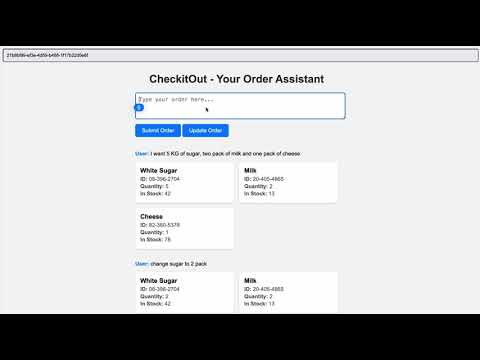
- Natural Language Order Parsing – Extracts products and quantities from user text.
- Product Matching with Vector Search – Finds the closest match in your store’s inventory using vector embeddings.
- Inventory-aware Matching – Includes stock quantity in the response.
- FastAPI Backend – RESTful API built for integration into any frontend.
- ChromaDB Vector Store – Persistent embedding storage for fast, similarity-based lookups.
- FastAPI – High-performance Python web framework.
- Google Gemini 1.5 Flash – NLP model for text understanding and generation.
- ChromaDB – Vector database to store and query product embeddings.
- Pydantic – FastAPI schema validation.
- python-dotenv – For secure API key management.
git clone https://github.com/your-username/ShopAI.git
cd ShopAIMake sure Python 3.8+ is installed:
pip install -r requirements.txtThis installs:
google-generativeaifastapiuvicornrequestspython-dotenvchromadb- Any other required packages
Create a .env file in the root directory:
GOOGLE_API_KEY=your_gemini_api_key_here
Replace with your actual Gemini API key.
uvicorn src.main:app --reloadVisit: http://127.0.0.1:8000/shopai
Simple health check.
Response:
{ "message": "ShopAI is up and running!" }Sends an order string and receives matched product details from inventory.
This route adds new items to the current order list for the given user. It does not remove or update existing items in the list.
Request:
{
  "user_id": 1,
  "user_input": "order 2 kg Sugar and 5 Black coffee 5 carrots and 1 litre Milk"
}
Response:
[
    {
        "session id": "580320b5-5dcb-4721-8383-223d1388c41c",
        "user": "add 5 kg Milk, 1 kg Flour, 2 pack of Coffee, and 1 kg Sugar",
        "response": [
            {
                "product_id": "37-606-0510",
                "product_name": "Milk",
                "quantity": 5,
                "inv_qty": "18"
            },
            {
                "product_id": "05-334-2923",
                "product_name": "Bread Flour",
                "quantity": 1,
                "inv_qty": "14"
            },
            {
                "product_id": "57-562-2358",
                "product_name": "Black Coffee",
                "quantity": 2,
                "inv_qty": "37"
            },
            {
                "product_id": "22-141-9798",
                "product_name": "White Sugar",
                "quantity": 1,
                "inv_qty": "47"
            }
        ]
    }
]
This route adds new items to the existing order list for the given user.
Request:
{
  "user_id": 1,
  "user_input": "add Cucumber and 5 oranges",
  "session_id": "580320b5-5dcb-4721-8383-223d1388c41c"
}
Response:
 {
        "session id": "580320b5-5dcb-4721-8383-223d1388c41c",
        "user": "add Cucumber and 5 oranges",
        "response": [
            {
                "product_id": "37-606-0510",
                "product_name": "Milk",
                "quantity": 5,
                "inv_qty": "18"
            },
            {
                "product_id": "05-334-2923",
                "product_name": "Bread Flour",
                "quantity": 1,
                "inv_qty": "14"
            },
            {
                "product_id": "57-562-2358",
                "product_name": "Black Coffee",
                "quantity": 2,
                "inv_qty": "37"
            },
            {
                "product_id": "22-141-9798",
                "product_name": "White Sugar",
                "quantity": 1,
                "inv_qty": "47"
            },
            {
                "product_id": "76-340-4432",
                "product_name": "Cucumber",
                "quantity": 1,
                "inv_qty": "19"
            },
            {
                "product_id": "76-540-6407",
                "product_name": "Orange",
                "quantity": 5,
                "inv_qty": "92"
            }
        ]
}Updates an existing order by modifying quantities, removing items, or changing the item list entirely.
This route replaces the user's current order list with the new one provided. It allows for full updates: modifying quantities, removing unwanted items.
Request:
{
    "session_id": "580320b5-5dcb-4721-8383-223d1388c41c",
    "instruction": "remove Sugar"
}
Response:
 {
        "session id": "580320b5-5dcb-4721-8383-223d1388c41c",
        "user": "add Cucumber and 5 oranges",
        "response": [
            {
                "product_id": "37-606-0510",
                "product_name": "Milk",
                "quantity": 5,
                "inv_qty": "18"
            },
            {
                "product_id": "05-334-2923",
                "product_name": "Bread Flour",
                "quantity": 1,
                "inv_qty": "14"
            },
            {
                "product_id": "57-562-2358",
                "product_name": "Black Coffee",
                "quantity": 2,
                "inv_qty": "37"
            },
            {
                "product_id": "76-340-4432",
                "product_name": "Cucumber",
                "quantity": 1,
                "inv_qty": "19"
            },
            {
                "product_id": "76-540-6407",
                "product_name": "Orange",
                "quantity": 5,
                "inv_qty": "92"
            }
        ]
}ShopAI/
├── LICENSE
├── README.md
├── Store_id_00234.csv # Inventory CSV file
├── index.html # Frontend entry point (for GitHub Pages)
├── requirements.txt # Python dependencies
├── src/
│ ├── __init__.py # Makes src a Python package
│ ├── chroma_db.py # ChromaDB-related logic
│ ├── main.py # FastAPI server
│ └── parser.py # Order parsing logic
└── start_server.sh # Shell script to start the FastAPI server
Manual order entry is slow, error-prone, and inefficient. ShopAI automates this process by understanding user input using AI and mapping it directly to your product inventory.
Use cases include:
- Retail stores automating sales desk input
- Voice assistant integration
- Inventory chatbots
- E-commerce platforms with smart order handling
- Fork the repo
- Create your feature branch:
git checkout -b my-feature - Commit changes:
git commit -m 'Add feature' - Push to your branch:
git push origin my-feature - Open a Pull Request
MIT License – see the LICENSE file.