Releases: LetPeopleWork/Lighthouse
Lighthouse v26.2.11.7

Process Behaviour Charts
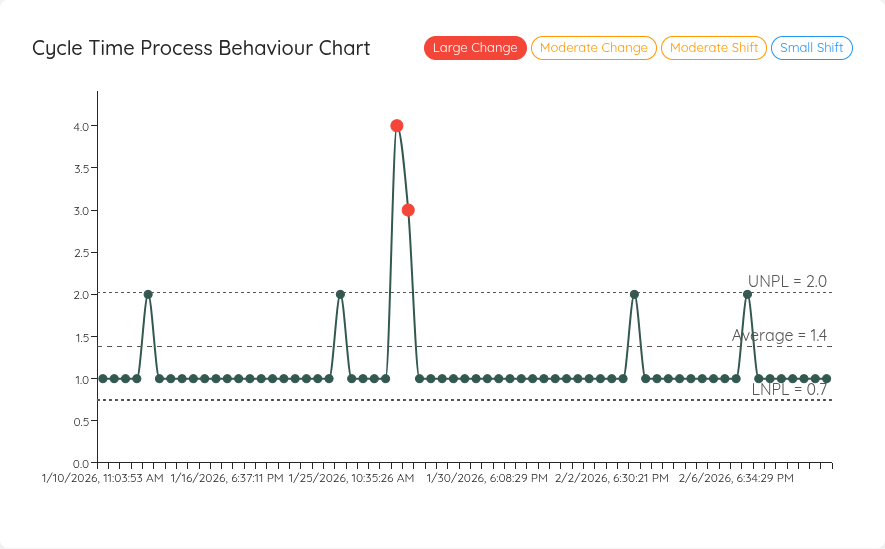
Process Behaviour Charts (PBCs) help you understand whether changes in your system are likely just normal variability, or whether you are seeing a special cause (something worth investigating). Lighthouse now supports PBCs for both Teams and Portfolios, for Throughput, Cycle Time, Work In Progress, and Work Item Age.
In order to get the chart, you must configure a baseline for your PBC. You do this in the Team Settings or Portfolio Settings. Once you did this, the charts will appear in your Metrics tab:
Adjustments to Additional Fields Configuration
If you add or modify the additional fields, you must make sure to refresh your teams and portfolios before the fields are loaded. This was not obvious, thus we added a small info box about it.
In case of using an Option Field in Jira as additional field, Lighthouse was fetching too much information (a whole json object). This is fixed in this version and you get the exact value that is selected.
On top of that, you can now also specify the "id" of a field, next to the already supported "Key" and "Name" properties. This is useful as (some?) versions of Jira Data Center do not expose a key property. In most cases, id and key will actually be the same property (at least in Jira Cloud), so not much will change if you do not use Jira Data Center.
Furthermore, we decided to make the additional fields part of the premium features. The additional fields allow to deal with customization from your Jira instance and will mainly be used for advanced features or quality of life improvements. For both those things we do have the premium model in place.
Starting with this release, you are restricted to a single additional field if you are on the community version. This allows you to test various scenarios and features, to make sure it works with your work tracking system, while giving us a marketable feature to sell premium licenses.
Other Improvements and Bug Fixes
- The Feature List for deliveries now also allows you to Hide completed Features
- Update of various third party components
Contributions ❤️
Special thanks to everyone who contributed feedback for this release:
Lighthouse v26.2.7.3
Rule-Based Delivery Feature Assignment [Premium Only]
You can now automatically assign Features to Deliveries using rule-based expressions instead of manual selection. Define rules using available fields (Type, State, Tags, any Additional Field) with operators like equals, contains, or not equals to create dynamic feature selection.
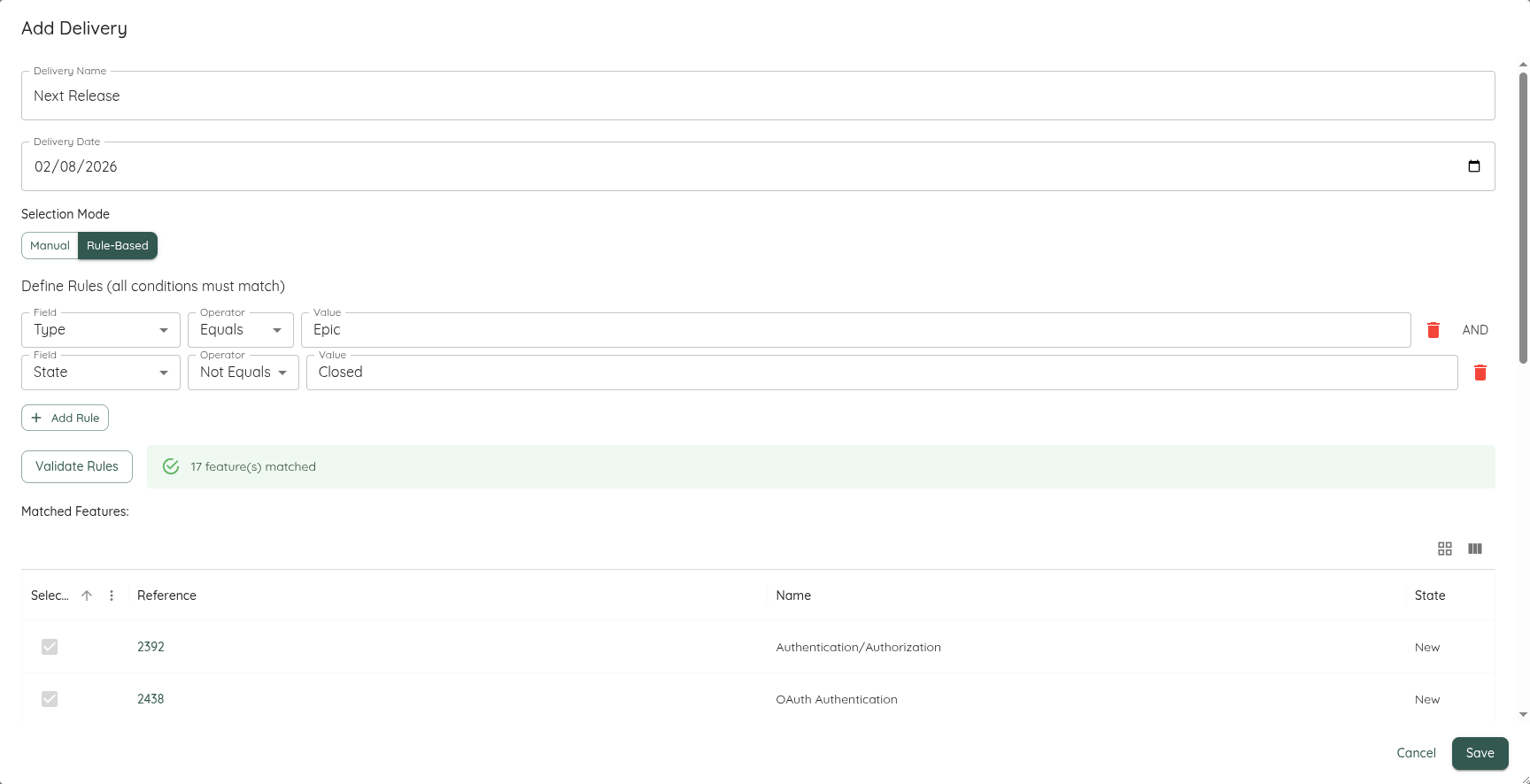
When creating or editing a Delivery, switch to the expression editor to define your rules. Multiple rules are combined with AND logic. The system validates your expression and shows matching features before saving. Deliveries using expressions automatically update when the Portfolio refreshes, adding new matching features and removing those that no longer match.
This feature is ideal for teams using FixVersions (Jira), Area Paths (Azure DevOps), or custom tags to organize their release planning.
MCS Backtesting Improvements
The Forecast Backtesting visualization has been enhanced with improved clarity and usability:
- Actual completion date now shown as a clear vertical line instead of an additional bar
- Added the average forecast as a comparison value
- Improved layout and spacing for the Predictability Score display
- Fixed issue where backtesting time frames were incorrectly calculated
These changes make it easier to evaluate forecast accuracy and understand the relationship between predictions and actual outcomes.
Changes to Premium Features
- Terminology Configuration is now a premium feature
- New Work Item Prediction (forecasting arrival of work) is now available in the Community Edition
Feature Management Improvements
Managing features across teams and portfolios has been streamlined:
- Completed features are now hidden by default to reduce clutter
- Feature state is now visible in the feature list instead of just showing the State Category as an icon
- Removed the "Updated on" column to simplify the view
- Feature tabs are disabled on Teams that aren't part of any Portfolio
Other Improvements
- Manual forecasts now allow you to specify either a target date OR remaining items, not requiring both
- System startup now displays
localhostURLs instead of[::]for better clarity - Fixed issue where Total Work Item Age widget didn't match the Work Item Age Run Chart
- Fixed compatibility issue loading configurations from older Lighthouse versions
- Resolved Jira custom field handling issue that could cause connection problems in case you had duplicate names of custom fields (thanks Jira...)
Contributions ❤️
Special thanks to everyone who contributed feedback for this release:
Lighthouse v26.1.30.10
MCS Back-Testing
You can now validate Lighthouse's Monte Carlo Simulation forecasts against historical data using the new Forecast Backtesting feature. This helps build confidence in the forecasting system by comparing predicted outcomes with actual historical throughput.
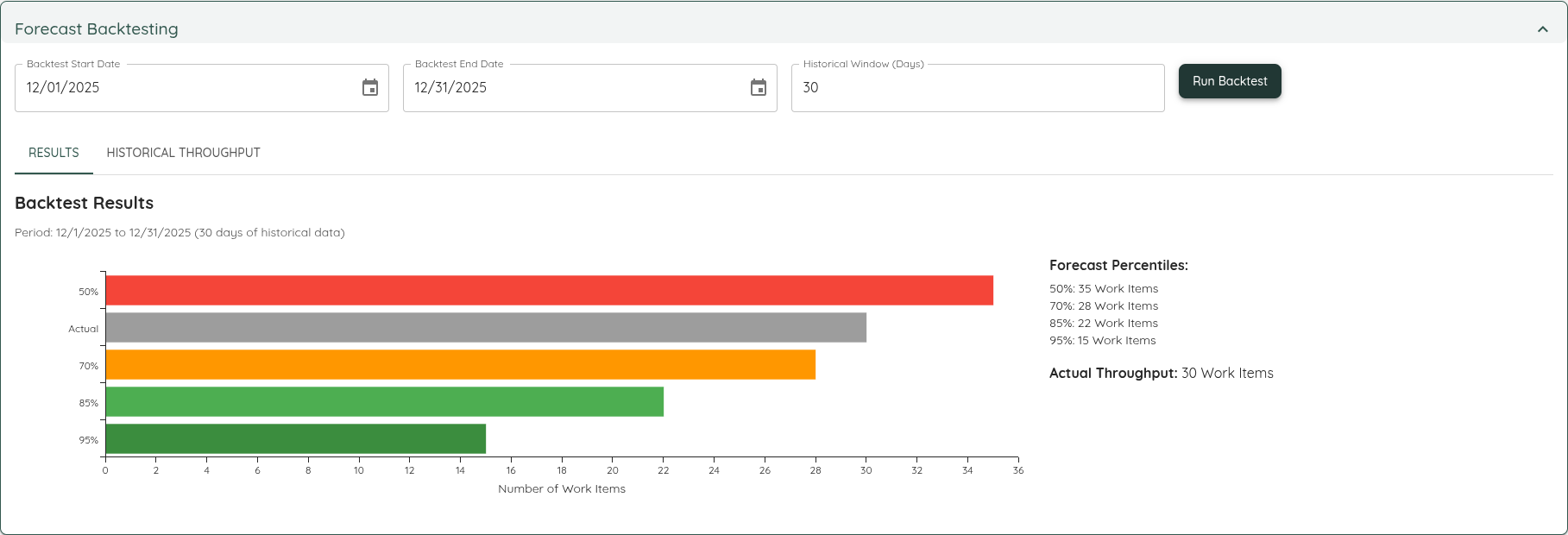
Navigate to any Team's Forecasts tab to find the new Forecast Backtesting section. Select a historical time period and run a backtest to see:
- How many items the MCS predicted would be completed (at 50%, 70%, 85%, and 95% confidence levels)
- The actual number of items that were completed during that period
This feature empowers teams to assess the reliability of Lighthouse forecasts using their own historical data.
Delivery Improvements
The Feature Selection for the Delivery creation now features two new improvements:
- A Select All button that will select all Features that are currently in view (this will respect any filter you've set in the grid - only the visible features will be selected)
- The state of a feature is now shown as a dedicated column
Spotlighting Charts
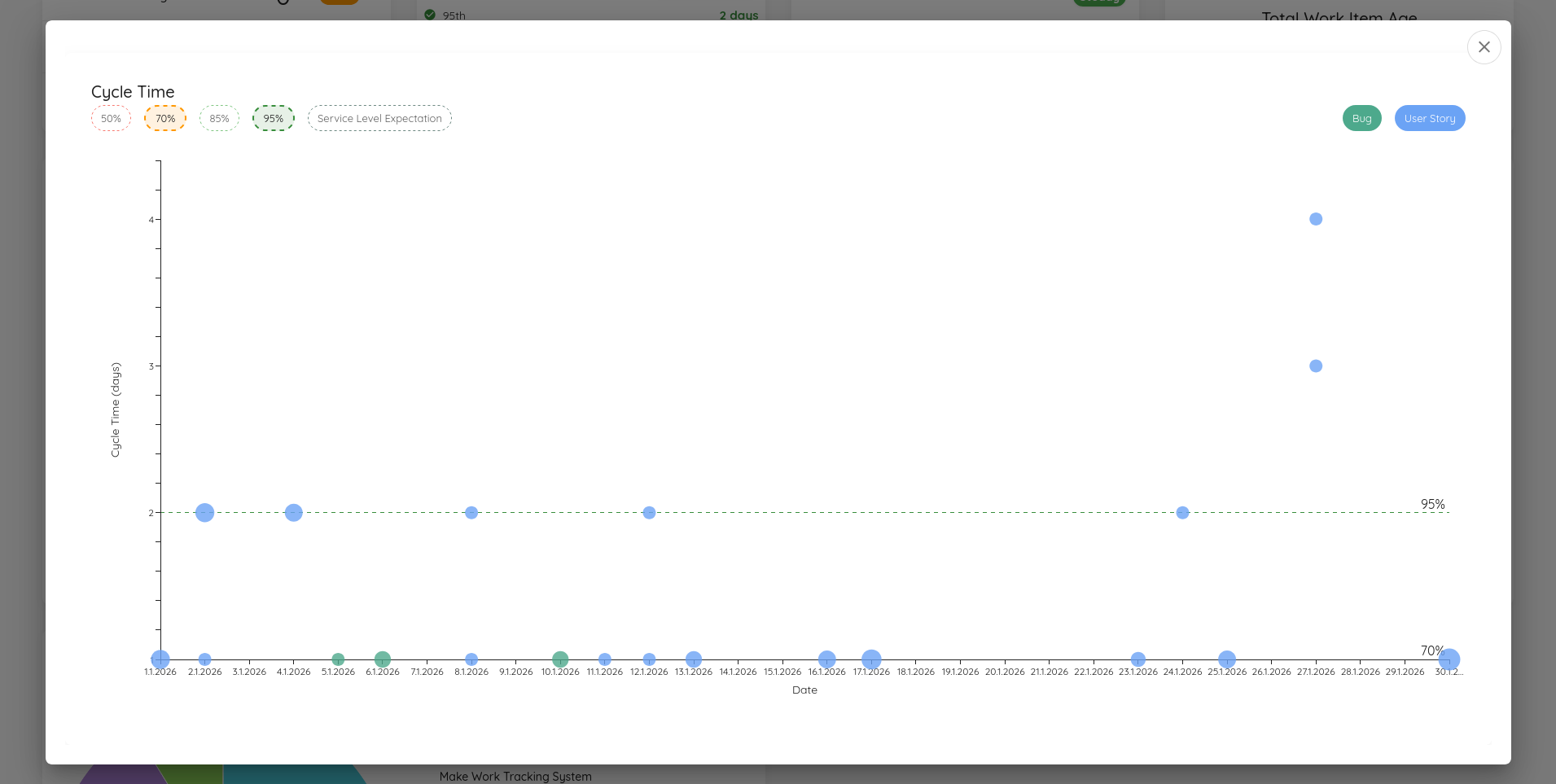
You can now spotlight a chart in the Metrics section. By doing so, you'll get an expanded view of this chart. This is especially useful when teaching about flow metrics or when you want to highlight something specific.
Other Improvements
- The various "reload" buttons have now more distinct icons so they are not easily mixed up
- If percentiles on the Feature Size, Cycle Time Scatterplot, or Work Item Aging chart are overlapping, by default only the higher percentile will be shown
- Updated various third party dependencies
Contributions ❤️
Special Thanks to everyone who contributed their feedback to this release:
Lighthouse v26.1.17.4
Jira and Azure DevOps Board Wizards
If you use a Jira or Azure DevOps connection, Teams and Portfolios can now fetch some settings through a Board Wizard from their existing Boards.
The Wizard will display all available boards. If you chose a board, it will read:
- The JQL/WIQL for this board
- The work item types on this board
- The states with a state mapping (by category)
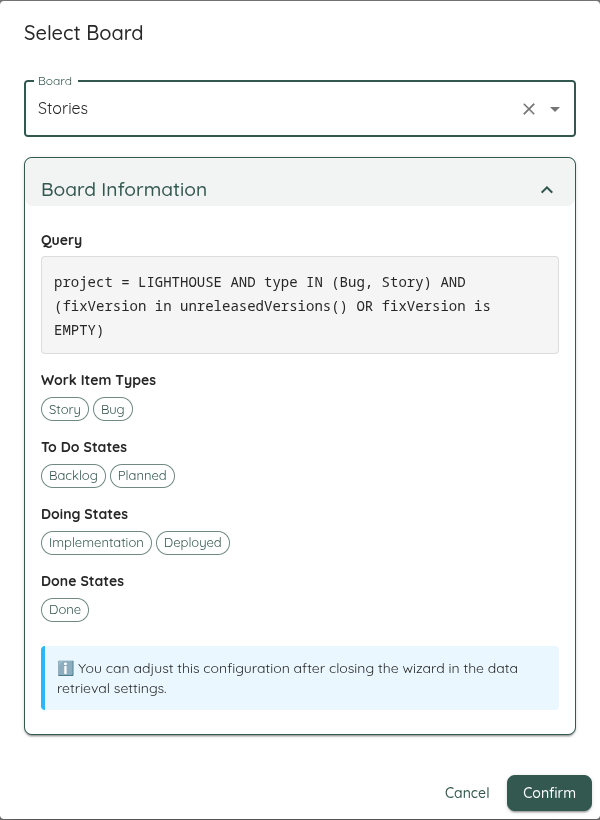
This one-time sync should simplify the initial creation of your Teams and Portfolios!
Delivery Improvements
After releasing the Delivery functionality, we got various feedback and improved the following things:
- The Delivery Header is now showing the 70, 85, and 95% likely dates
- All Deliveries are now ordered by their Delivery date, starting with the earliest first
- You can now see and select Done Features when you create or edit a delivery. The done Features are displayed in
strikethrough - The Delivery Creation Dialog can now be resized
- The label of the "Delivery Date" Textbox was not readable and was improved
- Instead of the "internal" ID of the Features, we display now the ID from your System (e.g. the Key if you are on Jira)
- If deliverie dates were in the past, the likelihood was not correct. Now it's either 0% (if there is pending work) or 100% (if everything is done). There can't be anything in between for deliveries that are in the past

Other Improvements
- Updated various third party dependencies
- Attempted to improve Date handling, so that we do not get "one-off" issues depedning on the timezone you are in
Contributions ❤️
Special Thanks to everyone who contributed their feedback to this release:
Lighthouse v26.01.09.006
This release was focused on improving the additional field functionality of the Work Tracking Systems. Following changes related to this were implemented:
- Username is not shown in "Other Options" anymore if you choose Jira Data Center Auth Option
- You don't need to specify the token (or other secrets) if you modify only the additional fields
- For Jira Data Center, it will now automatically use the 'Epic Link' (for Teams) and 'Parent Link' (for Portfolios) fields to try to set the parent. If this convention is followed, no specific additional field and override is needed
- For Azure DevOps, you can now also specify the Field Name, not only the reference. Example: Previously you had to specify 'Microsoft.VSTS.Scheduling.Size', while now you could also refer to it simply via 'Size'. Both options work, reference or name. No migration is needed if you have already something specified.
Other Improvements
- Updated various third party dependencies
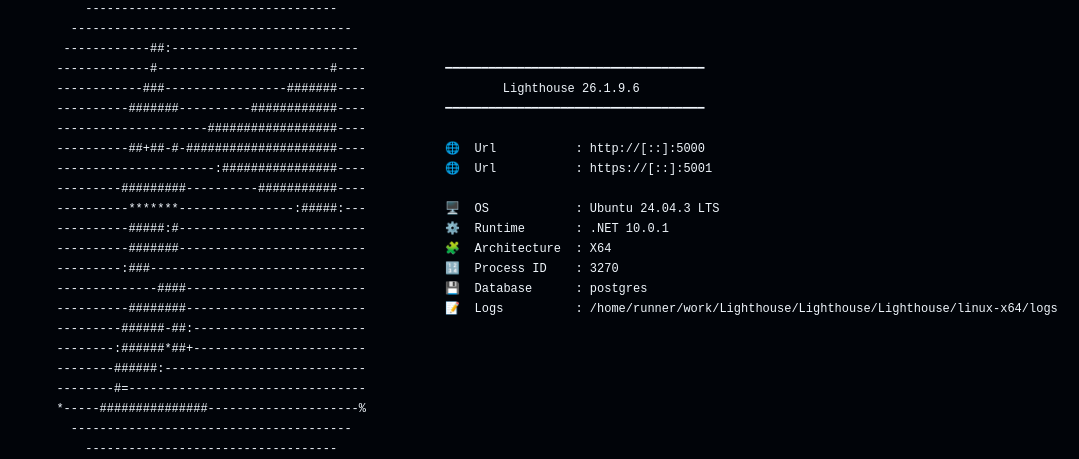
- Added a system info on startup that shows you the details of your Lighthouse instance:
Lighthouse v26.1.5.1620
This is a hotfix release that attempts to fix an issue that caused the validation to fail for Azure DevOps Work Tracking Connections if they had any additional field defined.
The check for the available fields is now changed, which should make it work for all environments, independent of user rights.
Special thanks to Lorenzo Santoro for reporting this and supporting with debugging!
Lighthouse v26.1.4.1559
This release was focused on a lot of infrastructure work in and around the Work Tracking System Connection. While the impact on the functionality right now is not as big, it will make future enhancements easier. This will include onboarding of new systems, supporting different authentication options, and dealing with the special configurations of the systems within their organization.
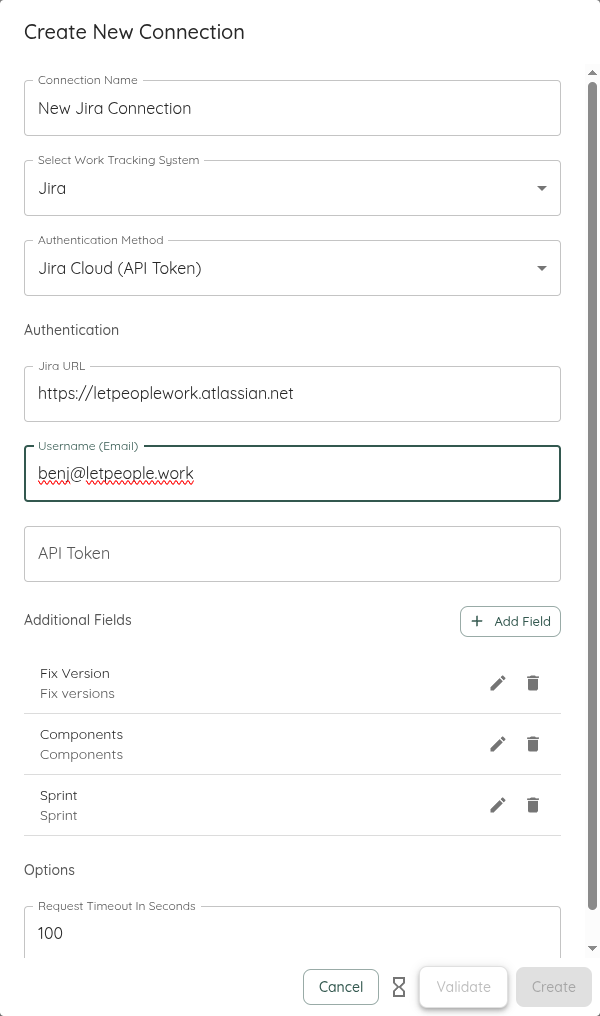
The Work Tracking System Connection configuration now looks like this:
Authentication Options
If a system supports different means for Authentication (right now only Jira), you can select the option. This will also adjust the options you need to specify. This is a big UX improvement over the previous approach where all options where visible, and depending on whether you filled in some field or not it would chose the authentication option.
Note: Existing systems will be working as before and all this data will be migrated
Additional Fields Configuration
For each supported Work Tracking System Connection, you can now add Additional Fields that should be fetched for all Work Items and Features. This allows to have data specific to your system and configuration in Lighthouse. Currently those additional fields are only used for Parent Overrides, Size Estimates, and Feature Owner definition (see below). However, this will be expanded in future.
Currently supported are Azure DevOps and Jira. They both come with a set of predefined additional fields:
- Azure DevOps: Area Path, Iteration Path, Size
- Jira: Fix Version, Component, Sprint
You can modify and remove those defaults as you please.
Note: This only applies to newly created system. Migrated Work Tracking System Connection will not have any additional fields by default.
Upon Validation of the system, It will check the Additional Fields. If a field cannot be found (e.g. due to a typo), the validation will fail. Please see respective documentation for Jira or Azure DevOps.
Options
At the bottom of the Work Tracking System Connections, you can find now options. So far only Jira and Azure DevOps offer additional options. It's the Request Timeout that was previously specified in the Work Tracking System Settings page. This is now specific per connection. If you had an existing value set, it will automatically be migrated.
Known Unpleasantries
As of now, you will have to provide the Authentication Token even if you don't change the authentication in the Work Tracking System Connection Dialog. We plan on improve this in future.
Parent Override Field ⚠️
While previously you could define any field in the Parent Override Field with free text, you now can chose from the additional fields. Instead of free text, you will get a selection
Size Estimate Field ⚠️
While previously you could define any field in the Size Estimate in the Portfolio Settings, you now can chose from the additional fields. Instead of free text, you will get a selection.
Feature Owner Field ⚠️
While previously you could define any field in the Featuer Owner in the Portfolio Settings, you now can chose from the additional fields. Instead of free text, you will get a selection.
Additional Work Tracking System Connection Related Changes
- The UI will now display the field for the Query only after selecting a work tracking system and show a tailored description (for example "JQL Query")
- You can now specify CSV content directly, without the need of having a file uploaded
- The File Upload button for CSV looks slightly different as it's done in a more generic way
Removal of Unparented Work Item Queries ⚠️
If you were heavily relying on this, please reach out to us for feedback.
Lighthouse v25.12.28.1246
New macOS App Bundle & Deployment Changes
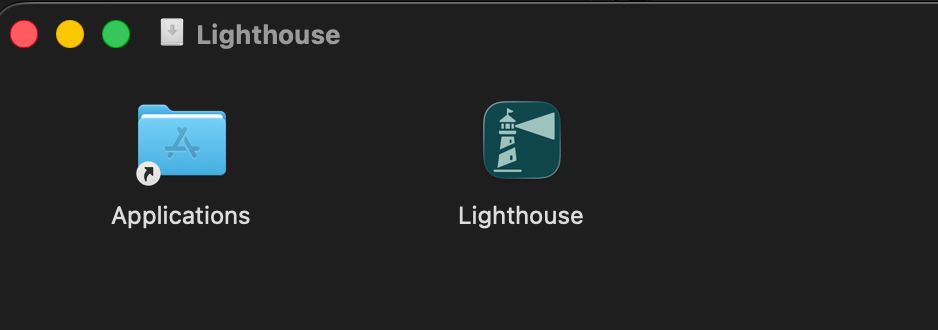
Lighthouse for macOS is now delivered in a proper app bundle structure, aligning with standard macOS application conventions.
You can now download Lighthouse for macOS as either a zip or a dmg file (recommended for easiest installation). Both formats are fully signed and notarized by Apple, ensuring maximum security and trust for all users.
Rework Settings for Portfolios and Teams
In order to change settings for Teams and Portfolios, you don't need to change the page anymore. Instead, you'll see the settings as dedicated tab. This should make it easier to change the settings and see the impact.
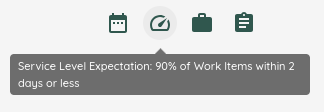
Furthermore, the notion of Quick Settings was introduced. For selected settings, you now see a Quick Settings Toolbar across all the tabs of a team and portfolio. On click, you can directly change these settings.
The following Quick Settings are available:
- Throughput Forecasting Configuration: Select which Throughput Period should be used for the forecasting of this team (Team only)
- Service Level Expectation Configuration
- System WIP Configuration
- Feature WIP: For a team, just change that individual teams Feature WIP. For Portfolios, change the Feature WIP of all involved teams.
Changing the Throughput Forecasting Configuration or the Feature WIP will trigger an automatic re-forecast for the affected team.
Other Improvements
- Added a "Cut Off" for Teams and Portfolios that will define where to cut off "done" items. This should help to reduce the load on the server as we will not fetch items that were done 5 years ago. This is configurable in the settings, and will default to 180 days (teams) and 365 days (portfolio).
- The "Update All" button in the Overview page was removed, and instead it's displayed in the header. Additionally, it will now be disabled if updates are running, and visualize how many update tasks are still ongoing.
- Updated various third party dependencies
Contributions ❤️
Special Thanks to everyone who contributed their feedback to this release:
Lighthouse v25.12.19.1534
Deliveries
Deliveries are named milestone dates for a portfolio that group a set of Features intended to be released together. They help you communicate target dates, track which features belong to a delivery, and see delivery-level progress alongside feature forecasts.
Deliveries appear in their own view for each Portfolio, including target date and the list of included features.
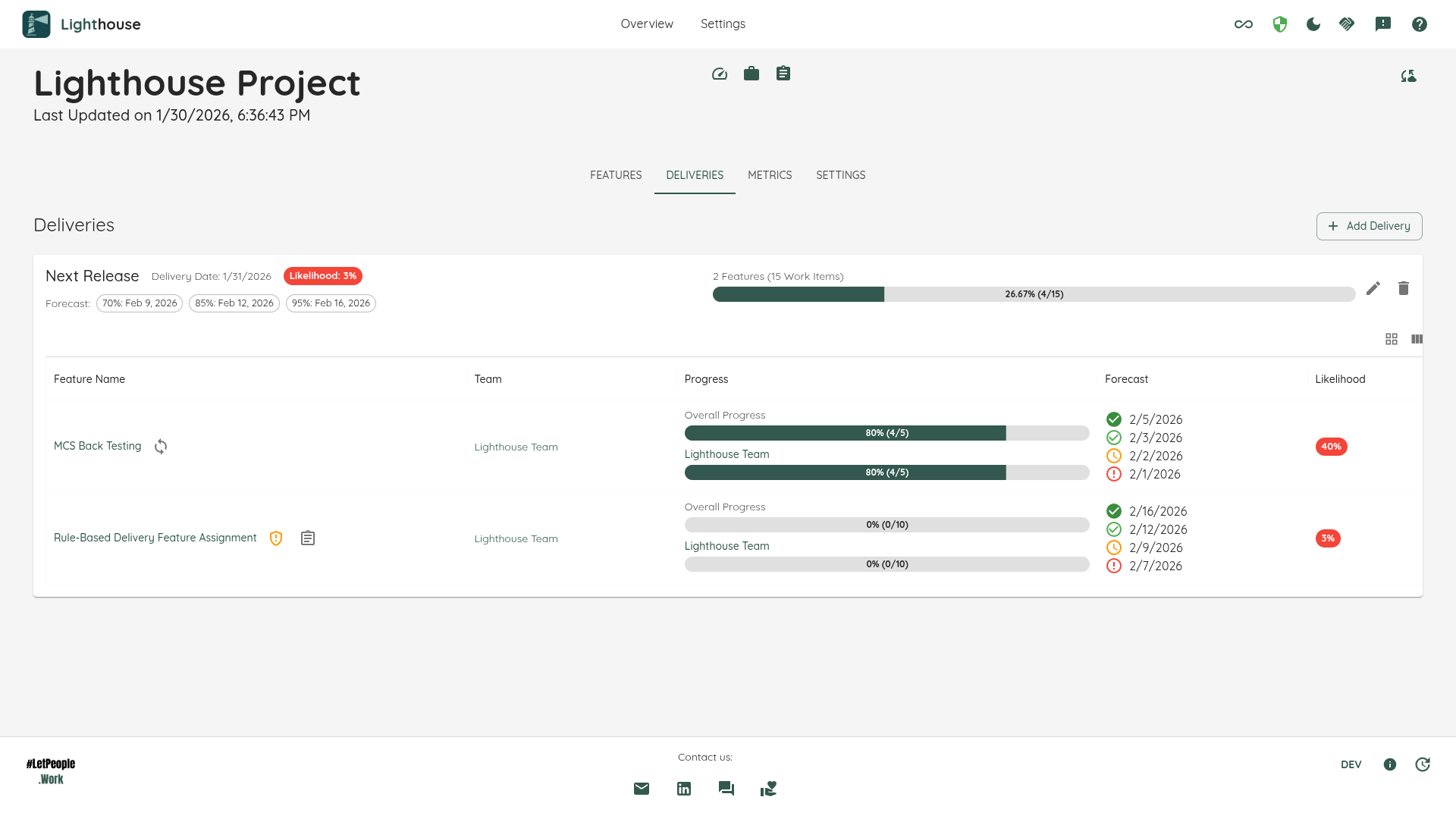
The delivery row shows the delivery name and date, an expand control to reveal included features and their statuses, and action buttons to edit or delete the delivery. Expanding a delivery displays each feature and its forecasted completion so you can assess delivery risk and progress at a glance.
Use deliveries to communicate release milestones and to group related features — this makes it easier to discuss release risk and progress with stakeholders.
Deliveries are also shown in the overview page for each Portfolio.
Note: If you are using the community edition, you can create one delivery. With a premium license, you get unlimited deliveries.
Digital Code Signing
The versions for Windows and macOS are now digitally signed. This means you can trust that the executables are coming from LetPeopleWork GmbH. On Windows, this means that you won't see the "Unknown Publisher" warning anymore, but can verify that the executable is trustworthy.
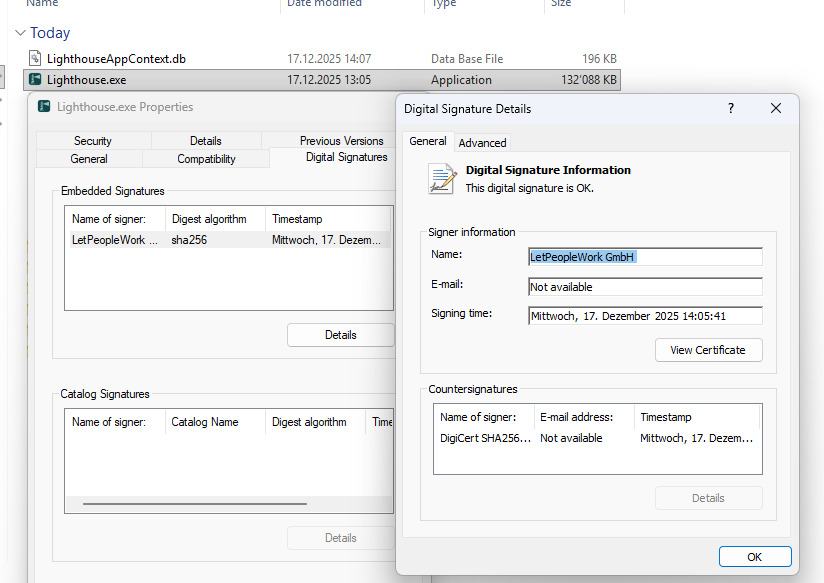
On macOS, you may still get a warning (after the download), but you could check through the commandline that it's signed and notarized through Apple. In a next release, this will improve also on macOS.
Bug Fixes and other Improvements
- Update of third party software to latest versions
- Work Distribution Chart details displayed Cycle Time for all Items. This lead to always showing 0 for in Progress work. For those item, now the Item Age is displayed.
- If you had an expired license, the update to a newer license was causing an error. This is fixed now.
- Reworked the tab structure in the Teams view, splitting Forecasts and Features into dedicated tabs.
Contributions ❤️
Special Thanks to everyone who contributed their feedback to this release:
Lighthouse v25.12.13.1012
v25.12.13.1012