File Chunker Workflow
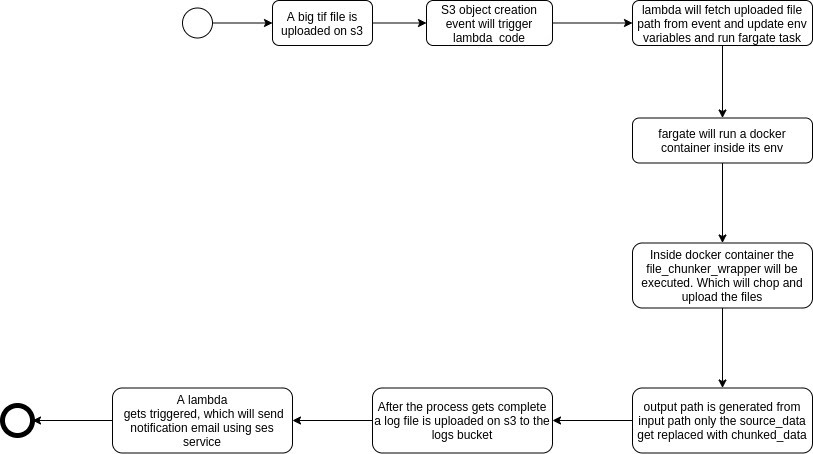
This workflow is for chopping the big size tif files into smaller ones. The small size tif is of size 400 X 400 px. The naming convention for the output tif file is original_filename_filecounter.tif i.e just adding filecounter at the end.
Note:- The filename from s3 should not contain special characters like ':' as this filename changes in other formats in s3 events and the process will fail.
ms_file_chunker/
- Dockerfile
- .env
- lambda_function.py
- requirements.txt
- src
- file_chunker.py
- file_chunker_wrapper.py
- init.py
- Python: 3.6.9
- OS: Ubuntu
- Required packages: AWS CLI, requirement.txt
- Open a terminal and move to the desired directory in which you want to set up all the things.
- Make sure you have defined python version and AWS CLI setup on your machine.
- Install virtualenv package using pip3: "pip3 install virtualenv"
- Create a virtualenv inside the dir so that the package required for this workflow can be installed separately: "python3 -m virtualenv venv"
- venv is the name of the virtualenv.
- Activate the venv : "source venv/bin/activate"
- You can see "(venv)" at the starting of every line in your terminal. i.e the env is now activated. So any installation made further will move to this virtual environment.
- Clone the code from GitHub to local dir: "git clone https://github.com/krakchris/TreeTect.git"
- Move to this workflow dir ie Treetect/ms_file_chunker
- Install the package required for this workflow: "pip3 install -r requirements.txt"
- These installation steps may vary depending on your machine i.e may be in python can refer to python3.6.9 in that case use python instead of python3, same goes for pip.